11 Plot Options
In this chapter, we explore visualization options available in the fect package. Plots are organized by type:
- the event study plot (
gap) - treated counterfactual plot (
counterfactual) - diagnostic plots (
equiv,placebo,carryover) - cumulative effects (
cumul) - treatment effect heterogeneity plots (
box,calendar, andhte) - special-purpose displays (
status,factors, andloadings) - standalone
esplot()
We begin with shared parameter conventions and then work through each plot type in turn. plot.fect is an S3 method that accepts a fitted fect object and a type argument. All customization parameters—axis limits, colors, text sizes, reference lines—are passed as additional arguments. Some parameters apply universally; others are type-specific. A parameter applicability table appears at the end of this chapter. R script used in this chapter can be downloaded here.
11.1 Load Data
We use two datasets throughout. Grumbach and Sahn (2020) examines the mobilizing effect of minority candidates on coethnic support in U.S. congressional elections. The treatment indicates the presence of an Asian candidate; the outcome is the proportion of general election contributions from Asian donors. Hainmueller and Hangartner (2019) study the effects of indirect democracy (treatment) on naturalization rates (outcome) in Swiss municipalities from 1991 to 2009.
11.2 Gap Plot
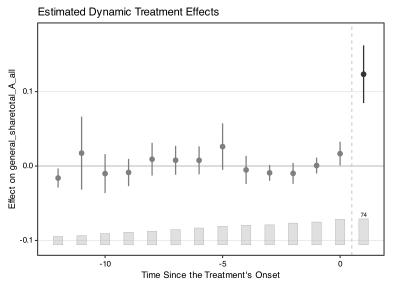
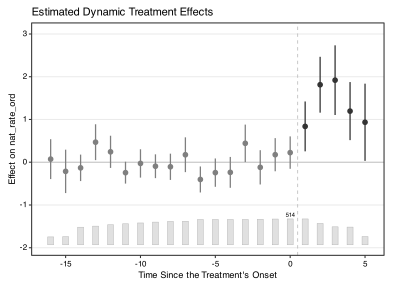
The gap plot—also known as the event study plot—displays dynamic treatment effects over relative time. It is the default plot type.
11.2.1 Default gap plot
We first estimate the model. For details on estimation, see Chapter 2.
out <- fect(Y = "general_sharetotal_A_all",
            D = "cand_A_all",
            X = c("cand_H_all", "cand_B_all"),
            index = c("district_final", "cycle"),
            data = gs2020, method = "fe",
            force = "two-way", se = TRUE,
            parallel = TRUE, cores = 16, nboots = 1000)
#> Some units are totally removed after drop missing values of the outcome or covariates.
#>
#>  +----------------------------------------------------------+
#>  | Parallel computing: using 16 of 20 available cores.      |
#>  |                                                          |
#>  | To change: set cores = <n> in fect().                    |
#>  | Default: min(available - 2, 8).                          |
#>  +----------------------------------------------------------+

out.hh <- fect(nat_rate_ord ~ indirect,
               data = hh2019,
               index = c("bfs","year"),
               method = 'fe', se = TRUE,
               parallel = TRUE, cores = 16, nboots = 1000,
               keep.sims = TRUE)
#> For identification purposes, units whose number of untreated periods <1 are dropped automatically.
#>
#>
#>  +----------------------------------------------------------+
#>  | Parallel computing: using 16 of 20 available cores.      |
#>  |                                                          |
#>  | To change: set cores = <n> in fect().                    |
#>  | Default: min(available - 2, 8).                          |
#>  +----------------------------------------------------------+
After running the model, we plot the dynamic treatment effects, including confidence intervals when se = TRUE is specified in estimation. Since type = "gap" is the default, we omit it.
11.2.2 Starting period
By default, the first post-treatment period is labeled 1 and the last pre-treatment period is 0. Some researchers prefer to label these as 0 and -1, respectively. Set start0 = TRUE to shift accordingly.
plot(out, start0 = TRUE,
     main = "Custom Starting Period")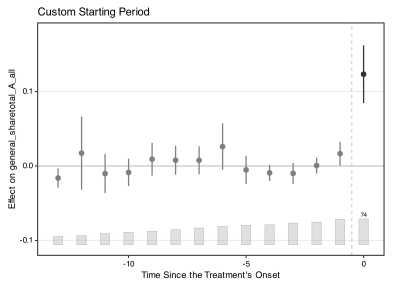
11.2.3 Connected estimates
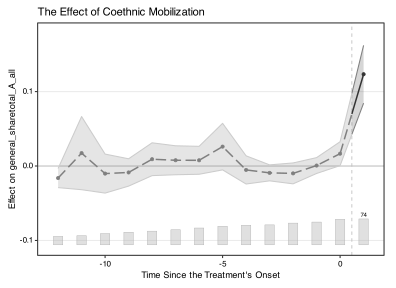
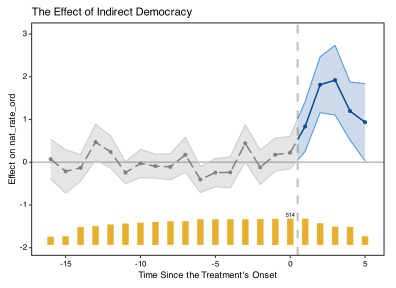
By default, estimates are plotted as discrete points. Set connected = TRUE to connect them with lines. The line width and point size are controlled by est.lwidth and est.pointsize.
plot(out,
     post.color = "green4",
     connected = TRUE,
     est.lwidth = 1.2,
     est.pointsize = 3)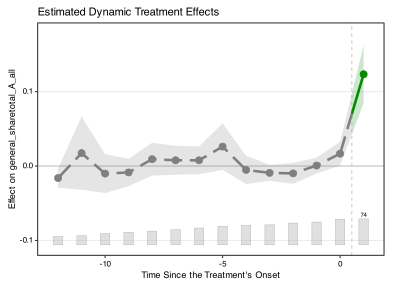
To outline the confidence interval band, add ci.outline = TRUE. This improves visibility when colors are similar to the background.
11.2.4 Presets
The preset argument applies coordinated color schemes. Options are "default" (mostly black and white with accent color), "vibrant" (saturated colors), and "grayscale" (monochromatic, suitable for journals that charge for color).
plot(out,
     preset = "vibrant",
     main = "Vibrant Preset Colors: Grumbach and Sahn (2020)")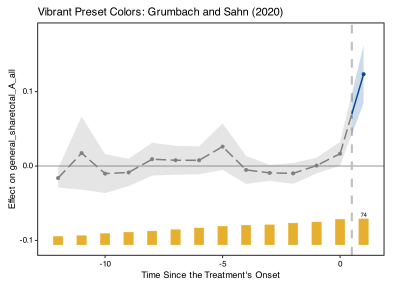
plot(out.hh,
     preset = "vibrant",
     main = "Vibrant Preset Colors: Hainmueller and Hangartner (2019)")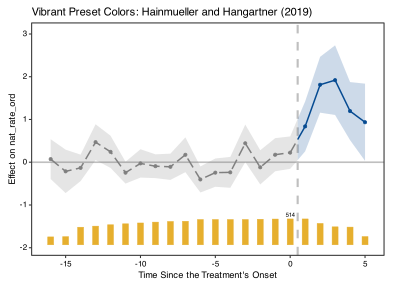
plot(out,
     preset = "grayscale",
     main = "Grayscale Preset Colors")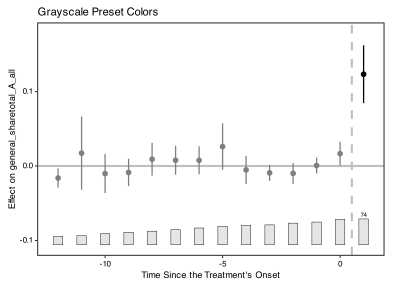
11.2.5 Colors
The color parameter sets the master color for estimate lines, points, and CI bands. In gap plots, color controls the post-treatment color; pre-treatment defaults to gray. To control each phase independently, use pre.color and post.color.
Default color conventions for gap plots: pre-treatment = gray (in-sample), post-treatment = black (out-of-sample). When loo = TRUE or dloo = TRUE, all points are black (all out-of-sample); the legend reads “LOO Estimates” or “Double-LOO Estimates” accordingly.
plot(out.hh,
     preset = "vibrant",
     post.color = "green4",
     main = "Change Estimates' Color: Hainmueller and Hangartner (2019)")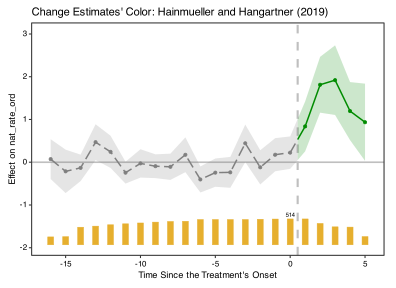
11.2.6 Confidence intervals
The plot.ci argument controls CI display. Options are "0.95" (default), "0.9", and "none".
plot(out, plot.ci = "0.9",
     main = "90% confidence intervals")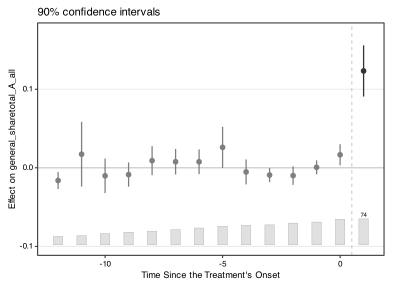
11.2.7 Count bars
The bar chart at the bottom of the plot shows the number of treated units at each relative time period. Customize it with count.color, count.outline.color, and count.alpha. Set show.count = FALSE to hide the bars entirely.
plot(out,
     count.color = "lightblue",
     count.outline.color = "darkblue",
     count.alpha = 0.2,
     main = "Count Histogram Customization")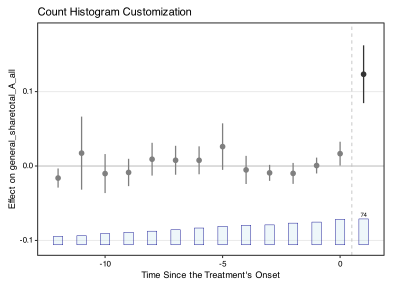
The proportion parameter controls which periods are displayed based on the count of treated units. Periods where the treated unit count falls below proportion \(\times\) max(count) are trimmed. The default proportion = 0.3 retains periods with at least 30% of the maximum treated unit count. When xlim is specified explicitly, proportion is overridden.
11.2.8 Axis customization
Use xlim/ylim for axis ranges, xbreaks/ybreaks for tick marks, xlab/ylab for labels, and xangle for rotating x-axis text. Set gridOff = TRUE to remove grid lines.
plot(out,
     xlim = c(-10, 1),
     ylim = c(-0.15, 0.30),
     xlab = "Custom Time Axis",
     ylab = "Estimated ATT",
     xangle = 90,
     xbreaks = seq(-10, 1, by = 2),
     gridOff = TRUE,
     main = "Axis and Legend Customization")
#> Scale for x is already present.
#> Adding another scale for x, which will replace the existing scale.
#> Scale for x is already present.
#> Adding another scale for x, which will replace the existing scale.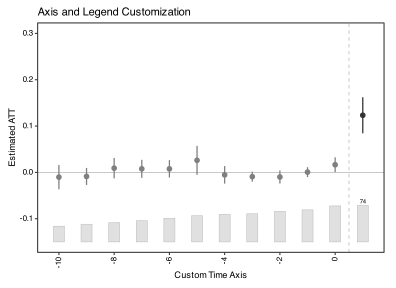
11.2.9 Text sizes
The cex.* family of parameters controls text sizes: cex.main (title), cex.axis (tick labels), cex.lab (axis labels), cex.text (annotations), and cex.legend (legend text). The theme.bw option toggles the black-and-white ggplot2 theme.
plot(out,
     ylim = c(-0.15, 0.3),
     theme.bw = FALSE,
     cex.main = 1.25,
     cex.axis = 1.2,
     cex.lab = 1.2,
     cex.legend = 1,
     cex.text = 1.2,
     main = "Text and Theme Customization")
#> Note: `theme.bw = FALSE` is soft-deprecated. The modern style is now the default; pass `legacy.style = TRUE` for byte-identical pre-2.3.1 reproduction. `theme.bw` is slated for removal in v2.5.0.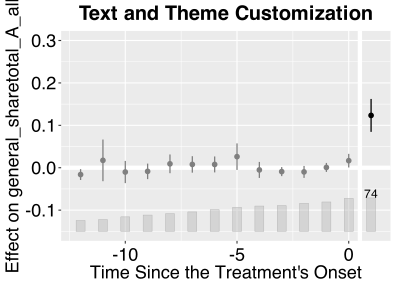
11.2.10 Title style
plot.fect() returns a ggplot object, so the title’s style (alignment, weight, font face) is best customized by composing a ggplot2::theme() onto the returned plot rather than via a dedicated argument. The modern v2.3.1 default is plain, left-aligned (hjust = 0, face = "plain"); to recover the pre-2.3.1 bold, centered look, override plot.title:
plot(out, main = "Bold Centered Title") +
  theme(plot.title = element_text(hjust = 0.5, face = "bold"))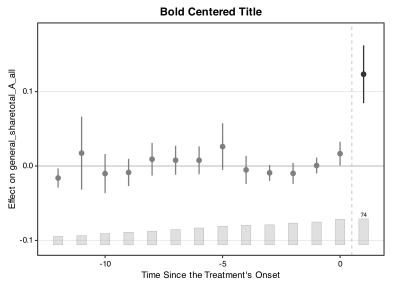
Common variations:
-
Centered, plain (most journals):
theme(plot.title = element_text(hjust = 0.5)) -
Bold, left-aligned (modern emphasis):
theme(plot.title = element_text(face = "bold")) -
Italic, left-aligned:
theme(plot.title = element_text(face = "italic")) -
Larger title (without
cex.main):theme(plot.title = element_text(size = 16)) -
Custom font family:
theme(plot.title = element_text(family = "serif"))
element_text() arguments compose, so multiple tweaks combine in a single call:
plot(out, main = "Centered, Bold, Larger") +
  theme(plot.title = element_text(hjust = 0.5, face = "bold", size = 14))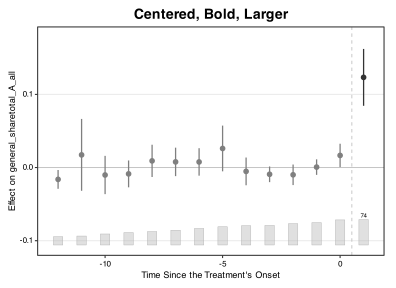
The same pattern works for axis labels (axis.title.x, axis.title.y), tick text (axis.text), and legend text (legend.text); see ?ggplot2::theme for the full list.
11.2.11 Reproducing pre-2.3.1 figures
If you have figures embedded in a paper under review, slides, or an existing manuscript and need them to look exactly the way they did before fect 2.3.1, pass legacy.style = TRUE:
plot(out, legacy.style = TRUE)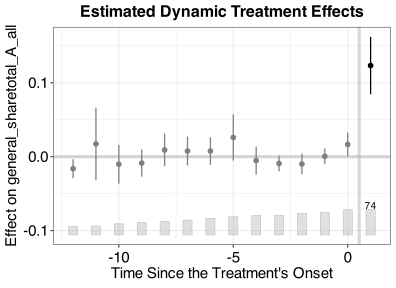
legacy.style = TRUE is a single-argument escape hatch that restores the entire pre-2.3.1 visual recipe in one call: bold centered title, larger axis text (cex.main = 16, cex.lab / cex.axis = 15), solid treatment-onset vline (no dashed), gray-50 pre-treatment / black post-treatment colors, blue placebo triangles (no peach highlight rectangle), and the classic ggplot2 theme_bw() panel with grid. It does not require touching theme.bw, individual cex.*, or any color argument — and it works regardless of how theme.bw is set:
-
legacy.style = TRUE+theme.bw = TRUE(or unset) reproduces the pre-2.3.1 white-panel default. -
legacy.style = TRUE+theme.bw = FALSEreproduces the pre-2.3.1 gray-paneltheme_gray()look.
Use this for byte-identical regeneration of submitted-version figures, not for new work — the modern recipe (the v2.3.1 default) is recommended for any figure you are rendering for the first time.
theme.bw = FALSE (the pre-2.3.1 gray-panel look without legacy.style) is soft-deprecated and will be removed in v2.5.0. If you need that aesthetic, use legacy.style = TRUE + theme.bw = FALSE, which is preserved indefinitely.
11.2.12 Reference lines
The lcolor, lwidth, and ltype parameters control the horizontal (zero) and vertical (treatment onset) reference lines. Each accepts a vector of length two; if a single value is given, it applies to both lines.
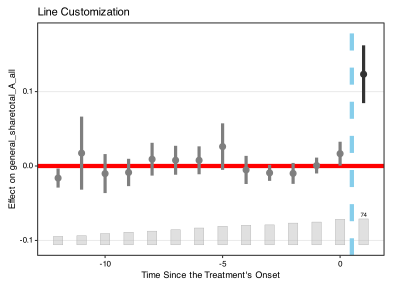
11.2.13 Gaps of chosen units
With id, the gap plot shows the gaps of the chosen treated units, by time relative to each unit’s treatment onset. A unit’s gap in a period is its observed outcome minus the outcome that the model predicts for it without treatment. With several units, the plot shows their unweighted average at each relative time, and the default proportion = 0.3 hides relative times at which fewer than 30% as many of them are observed as at the best-covered relative time (proportion = 0 shows them all).
A unit’s gap in one period is a noisy estimate of its treatment effect in that period. Under the model, the gap equals the effect plus two errors. The first comes from estimating the model and shrinks as the data grow. The second is the unit’s idiosyncratic error in that period, the part of its outcome that the model cannot explain, and more data do not remove it. For instance, if a unit’s outcome jumps in one period for reasons unrelated to the treatment, its gap jumps with it. The data cannot separate the effect of one unit in one period from that period’s idiosyncratic error, so this effect is not identified unless we assume that the model explains the untreated outcome exactly. Averages over many treated observations, such as the ATT, are identified because the idiosyncratic errors average out. Researchers should not read a single gap as a unit’s effect in that period. The gaps of single units show how each unit departs from its prediction, which helps to spot units that the model fits poorly.
The fit below has no standard errors, so the plots show point estimates only.
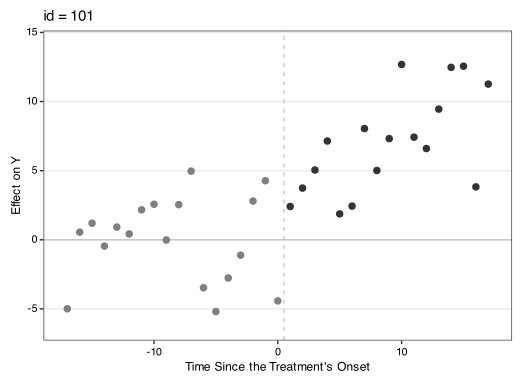
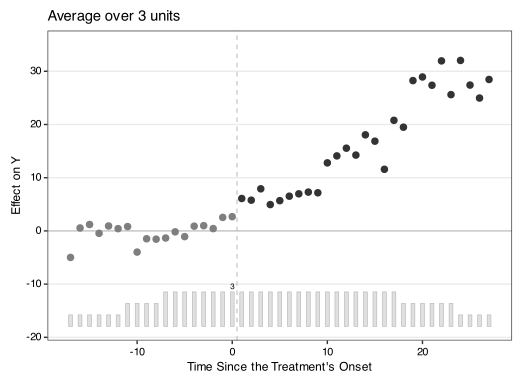
With parametric bootstrap draws, the plot adds a band around the gaps. The band shows how far a unit’s idiosyncratic errors can move its gap away from its effect, and it works like a prediction interval for that effect. As in Xu (2017), it treats each unit’s effects as fixed and its idiosyncratic errors as random, and the parametric bootstrap draws these errors from the prediction errors of control units, each control in turn playing the role of a treated unit. The band covers a unit’s effect at the stated rate only if the unit’s errors are distributed like those of the control units, independent across units and with the same spread. Even under that assumption, the band does not make the effect identified. Because the band is pointwise, about one 95% band in twenty can exclude zero before treatment even when the model is correct.
To draw the band, fit the model with vartype = "parametric" and keep.sims = TRUE; gsynth keeps the draws when its inference is parametric. At each relative time, the plot averages the chosen units’ draws within each replication and forms the band with the fit’s ci.method and alpha, as the default gap plot does. The band for one unit is usually wider than the band for the average over all treated units. With the nonparametric bootstrap (vartype = "bootstrap") or the jackknife, the plot shows point estimates only and prints a message, because those methods keep each unit’s own outcomes fixed and so cannot measure its idiosyncratic errors.
data(simgsynth)
out.gs <- fect(Y ~ D + X1 + X2, data = simgsynth, index = c("id", "time"),
               method = "gsynth", r = 2, CV = FALSE, se = TRUE,
               vartype = "parametric", nboots = 200, keep.sims = TRUE,
               seed = 1)
#>
#>  +----------------------------------------------------------+
#>  | Parallel computing: using 8 of 20 available cores.       |
#>  |                                                          |
#>  | To change: set cores = <n> in fect().                    |
#>  | Default: min(available - 2, 8).                          |
#>  +----------------------------------------------------------+
#> Parametric Bootstrap (para.error = "empirical")
#>
Simulating errors ...
#> Can't calculate the F statistic because of insufficient treated units.
plot(out.gs, type = "gap", id = 101)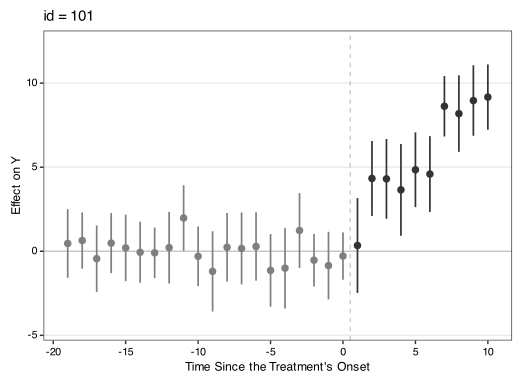
11.3 Counterfactual plot
While the gap plot shows the ATT (difference), the counterfactual plot shows the levels: observed outcomes for treated units alongside model-predicted counterfactual paths.
plot(out, type = "counterfactual",
     main = "Grumbach & Sahn (2020): Treated vs. Counterfactuals",
     ylab = "Proportion of Asian Donation",
     legend.pos = "bottom")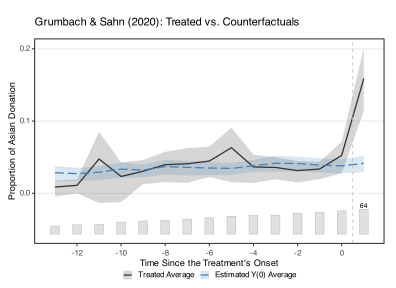
plot(out.hh, type = "counterfactual",
     main = "Hainmueller & Hangartner (2019): Treated vs. Counterfactuals",
     ylab = "Naturalization Rate",
     legend.pos = "top")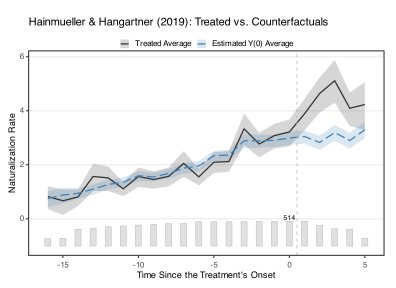
Use color for the observed-outcome line and counterfactual.color for the counterfactual line (which also colors the CI band with more transparency). Add ci.outline = TRUE to outline the band.
plot(out.hh, type = "counterfactual",
     main = "Hainmueller & Hangartner (2019): Treated vs. Counterfactuals",
     ylab = "Naturalization Rate",
     legend.pos = "bottom",
     ci.outline = TRUE,
     color = "red3",
     counterfactual.color = "green4")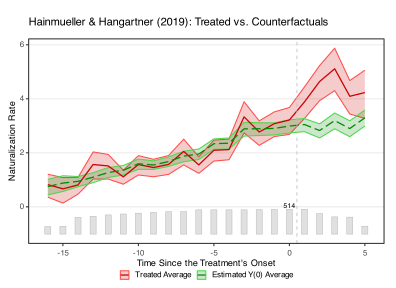
Setting raw = "all" overlays individual unit paths.
plot(out, type = "counterfactual", raw = "all")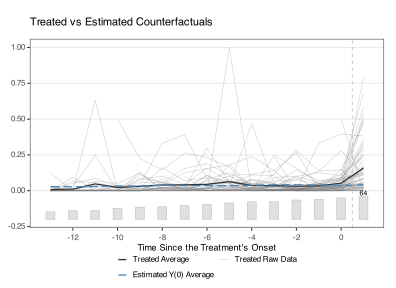
Setting raw = "band" displays the 5th–95th interpercentile range. When adoption is staggered, only the band around treated units is shown.
plot(out, type = "counterfactual", raw = "band")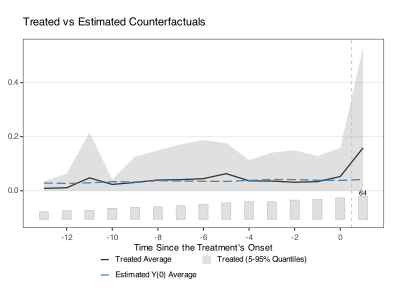
The individual-path colors are also customizable:
plot(out, type = "counterfactual",
     count.color = "black",
     count.alpha = 1,
     color = "red",
     counterfactual.color = "purple",
     counterfactual.raw.treated.color = "orange",
     counterfactual.linetype = "dotted",
     raw = "all",
     main = "Counterfactual Plot with Custom Colors")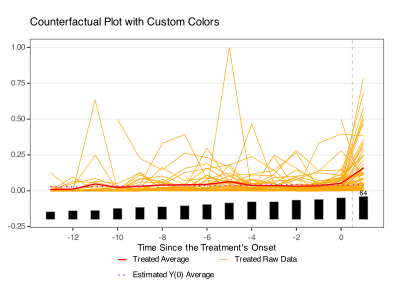
11.4 Pretrend Tests
We provide two tests that shed light on the parallel trends assumption: the placebo test and the equivalence test. For methodological details, see Chapter 2 or Liu, Wang, and Xu (2024).
11.4.1 Placebo test—shape markers
A placebo test artificially assigns treatment during pre-treatment periods and estimates the “placebo effect” in those periods. The model must be re-estimated with placeboTest = TRUE.
out_fe_placebo <- fect(Y = "general_sharetotal_A_all", D = "cand_A_all", X = c("cand_H_all", "cand_B_all"), data = gs2020,
                       index = c("district_final", "cycle"), force = "two-way",
                       method = "fe", CV = FALSE, parallel = TRUE, cores = 16,
                       se = TRUE, nboots = 1000, placeboTest = TRUE,
                       placebo.period = c(-2, 0))
#> Some units are totally removed after drop missing values of the outcome or covariates.
#>
#>  +----------------------------------------------------------+
#>  | Parallel computing: using 16 of 20 available cores.      |
#>  |                                                          |
#>  | To change: set cores = <n> in fect().                    |
#>  | Default: min(available - 2, 8).                          |
#> +----------------------------------------------------------+plot(out_fe_placebo)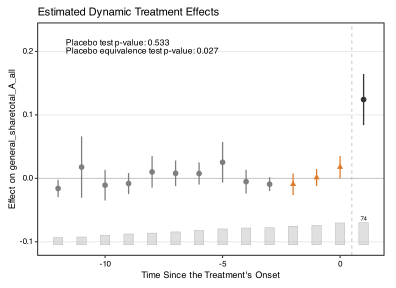
When placeboTest = TRUE and a placebo period is active, the placebo test periods are automatically marked with triangles (▲, shape 17) in the plot, while regular estimates use circles (●). This distinction is especially important in grayscale, where color alone cannot differentiate test periods from ordinary estimates. A legend at the bottom of the plot identifies each symbol. To suppress the legend, set legendOff = TRUE.
In connected mode, the triangle markers are scaled up so they remain visible alongside the line:
plot(out_fe_placebo, connected = TRUE, preset = "grayscale",
     main = "Placebo Test with Connected Estimates")
#> `geom_line()`: Each group consists of only one observation.
#> ℹ Do you need to adjust the group aesthetic?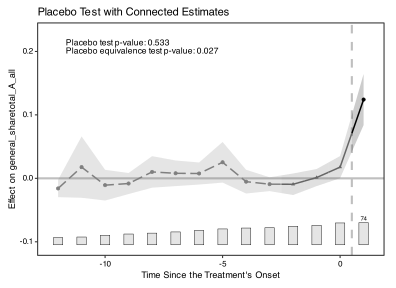
The color of the placebo period markers can be changed with the placebo.color argument.
plot(out_fe_placebo, placebo.color = "green4")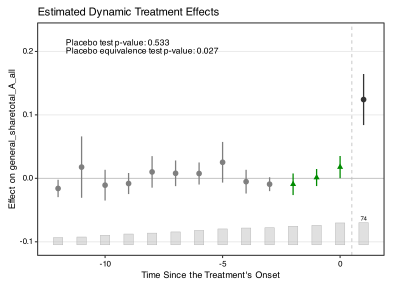
11.4.1.1 Highlighting controls
Two arguments compose to control how test periods are visually distinguished:
-
highlightselects which test types receive the accent treatment. Accepts:-
NULL(default): every test type that ran at fit time — placebo, carryover, andcarryover.rmcells. -
TRUE/FALSE: explicit on / off. - A character subset of
c("placebo", "carryover", "carryover.rm"): e.g.highlight = "placebo"restricts the accent to placebo periods on a fit that has bothplaceboTest = TRUEandcarryoverTest = TRUE; carryover periods then render as plain post-treatment circles.
-
-
highlight.fillcontrols whether the background rectangle is drawn behind highlighted periods (in a lightened tone of the period’s accent color). Default isFALSE— the colored glyph alone signals “this period is in a test window,” and the glyph-only look survives grayscale printing. SetTRUEfor slide / talk figures where the rectangle helps a remote audience locate the window.
| Goal | Call |
|---|---|
| Default — highlight every detected test type, no rectangle | plot(fit) |
| Add the background rectangle | plot(fit, highlight.fill = TRUE) |
| Only placebo periods, no rectangle | plot(fit, highlight = "placebo") |
| Only carryover periods, with rectangle | plot(fit, highlight = "carryover", highlight.fill = TRUE) |
| No highlighting at all (every period plain) | plot(fit, highlight = FALSE) |
plot(out_fe_placebo, highlight.fill = TRUE,
     main = "Placebo test with background rectangle")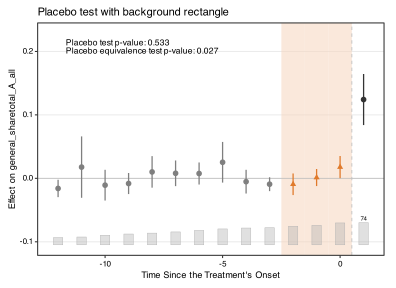
11.4.2 Joint pre-trend test
The equivalence plot displays only the pre-treatment period. The equivalence bound is defined by the two-one-sided test (TOST) threshold. Note: post-treatment estimates are not shown in this plot type—use the gap plot for those.
The bound option controls which reference lines appear: "none", "min" (maximum absolute pre-treatment residual), "equiv" (TOST threshold), or "both" (default).
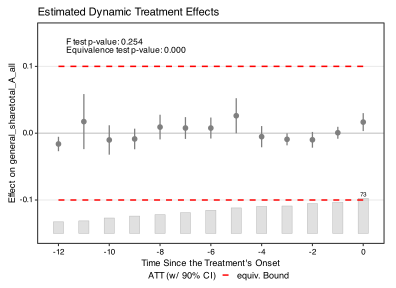
The "min" bound displays the minimum range based on the maximum absolute pre-treatment residual. For example, if the largest pre-treatment estimate is 0.03, lines appear at $$0.03.
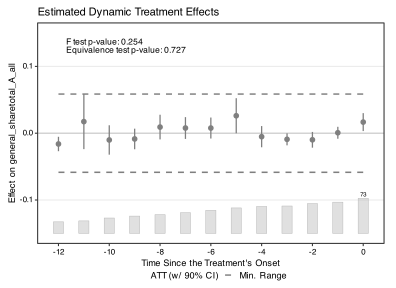
With bound = "both" (the default), both the minimum range and the equivalence bound are shown.
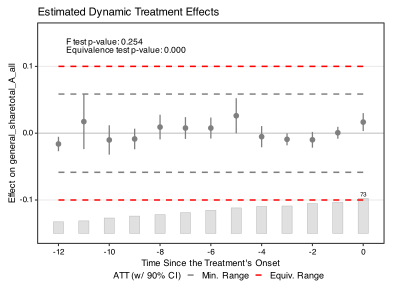
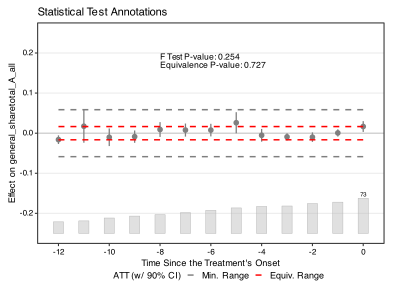
Use stats to select test results to display, stats.labs to label them, and stats.pos to position the annotation. Set show.stats = FALSE to hide test results entirely.
11.5 Carryover Test
The exit plot shows how the difference between treatment and control groups evolves after treatment ends. The x-axis represents time relative to treatment exit, in contrast to the gap plot’s focus on treatment entry. Exit plots are essential for assessing potential carryover effects.
In exit plots, the color convention is reversed from gap plots: pre-exit estimates are black (out-of-sample) and post-exit estimates are gray (in-sample).
plot(out_fe_placebo, type = "exit")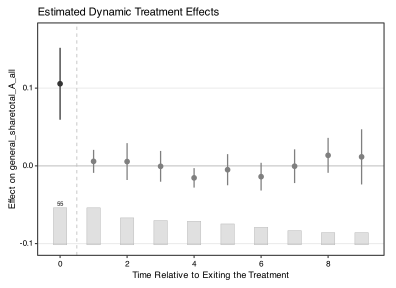
11.5.1 Carryover test with shape markers
The carryover test examines whether the treatment effect persists after treatment ends. By setting carryoverTest = TRUE and specifying carryover.period, we designate post-exit periods as a “placebo” window.
out_fe_carryover <- fect(Y = "general_sharetotal_A_all", D = "cand_A_all", X = c("cand_H_all", "cand_B_all"), data = gs2020,
                       index = c("district_final", "cycle"), force = "two-way",
                         parallel = TRUE, cores = 16, se = TRUE, CV = FALSE,
                         nboots = 1000, carryoverTest = TRUE,
                         carryover.period = c(1, 3))
#> Some units are totally removed after drop missing values of the outcome or covariates.
#>
#>  +----------------------------------------------------------+
#>  | Parallel computing: using 16 of 20 available cores.      |
#>  |                                                          |
#>  | To change: set cores = <n> in fect().                    |
#>  | Default: min(available - 2, 8).                          |
#> +----------------------------------------------------------+plot(out_fe_carryover)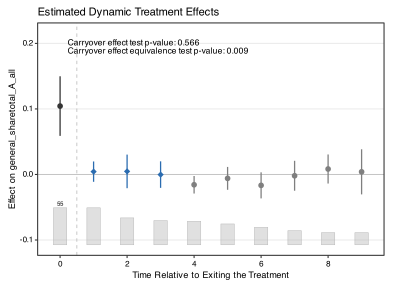
Carryover test periods are marked with diamonds (shape 18), while placebo test periods use triangles (shape 17). Both shapes are distinguishable in grayscale printing. When both tests are active in the same model, the legend differentiates all three symbol types (circles for regular estimates, triangles for placebo periods, diamonds for carryover periods).
11.6 Cumulative Effects
This section shows how to visualize cumulative treatment effects. The cumulative effect at event time \(k\) is the sum of the per-period ATTs from event time 1 to \(k\). For the underlying estimand and the unified API that produces it, see Chapter 3. The cumulative effect is only well-defined when there are no treatment reversals — that is, all treated units remain treated for the duration of the study. The model must be estimated with keep.sims = TRUE.
We first apply it to hh2019, which has no treatment reversals.
cumu.hh <- estimand(out.hh, "att.cumu", "event.time")
esplot(cumu.hh, Period = "event.time",
       Estimate = "estimate", CI.lower = "ci.lo", CI.upper = "ci.hi",
       main = "Cumulative Effect of Indirect Democracy",
       ylab = "Cumulative Effect on Naturalization Rate")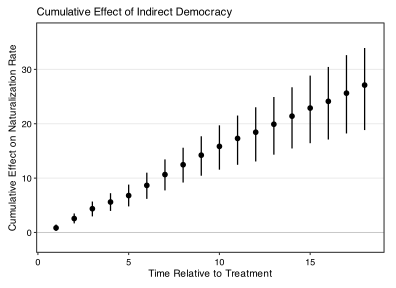
Since the gs2020 dataset has treatment reversals, we subset to units that remained treated throughout.
# flag units that ever have a 1 to 0 change in d
rev_flag <- tapply(gs2020[["cand_A_all"]],
                   gs2020[["district_final"]],
                   function(x) any(diff(x) < 0))

# units with no reversals
good_units <- names(rev_flag)[!rev_flag]

# subset the desired rows
gs2020_no_reversals <- gs2020[gs2020[["district_final"]] %in% good_units, ]
out_no_reversals <- fect(Y = "general_sharetotal_A_all",
D = "cand_A_all" ,
X = c("cand_H_all", "cand_B_all") ,
index = c("district_final", "cycle"),
data = gs2020_no_reversals,
method = "fe",
force = "two-way",
se = TRUE, parallel = TRUE, cores = 16,
nboots = 1000,
keep.sims = TRUE)
#> Some units are totally removed after drop missing values of the outcome or covariates.
#>
#> +----------------------------------------------------------+
#> | Parallel computing: using 16 of 20 available cores. |
#> | |
#> | To change: set cores = <n> in fect(). |
#> | Default: min(available - 2, 8). |
#> +----------------------------------------------------------+
#> Can't calculate the F statistic because of insufficient treated units.cumu.gs <- estimand(out_no_reversals, "att.cumu", "event.time")
esplot(cumu.gs, Period = "event.time",
Estimate = "estimate", CI.lower = "ci.lo", CI.upper = "ci.hi",
xlim = c(1, 2))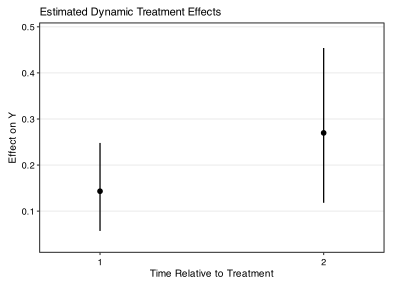
11.7 Effect Heterogeneity
11.7.1 Box plot (type = "box")
The box plot displays the distribution of individual treatment effects in each period. The box spans the interquartile range (middle 50%), whiskers extend to the 2.5th–97.5th percentiles, and the horizontal line marks the median.
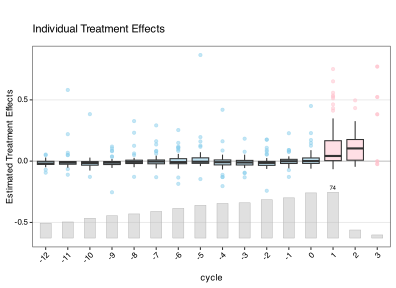
The proportion parameter controls the x-axis range for box plots. Periods where the number of treated units falls below proportion \(\times\) max(count) are trimmed from the display. The default proportion = 0.3 keeps periods with at least 30% of the maximum treated unit count. When there are many time periods, x-axis labels are automatically thinned and rotated for readability.
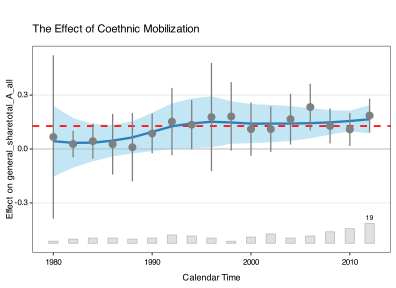
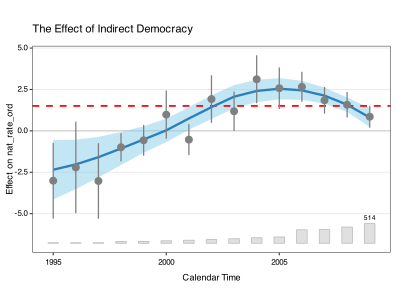
11.7.2 Calendar plot (type = "calendar")
The calendar plot depicts the ATT conditional on calendar time (rather than relative time). The ribbon represents a loess fit with 95% confidence intervals.
11.7.3 HTE by covariate (type = "hte")
The "hte" plot (or equivalently "heterogeneous") displays the conditional average treatment effect (CATT) as a function of a pre-treatment covariate. The covariate argument specifies which variable to use. The blue curve and band show a loess fit with 95% confidence intervals; the red dashed line marks the overall ATT; and a histogram at the bottom shows the covariate distribution.
plot(out, type = "hte", covariate = "cand_B_all",
     main = "HTE by Black Candidate Presence",
     xlab = "Black Candidate Indicator",
     ylab = "Effect on Asian Donation Share")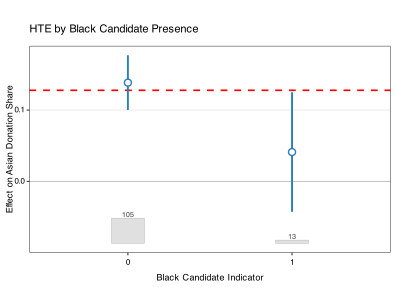
When the covariate is discrete, the plot automatically switches to a grouped display. Use covariate.labels to assign readable labels to the discrete values:
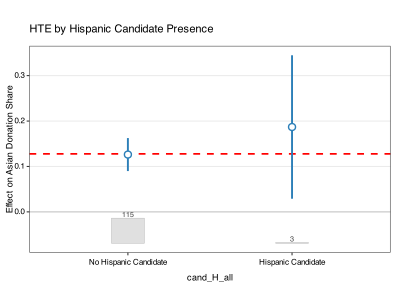
Key parameters for HTE plots: covariate (required), covariate.labels (for discrete covariates), show.count (toggle covariate histogram, default TRUE). Axis, text size, and color parameters apply as usual. For more on HTE analysis, see Chapter 8.
11.8 Other Plot Types
11.8.1 Status plot
The status plot displays the treatment status by period for all units, similar to panelView. Each indicator color is customizable.
plot(out_fe_carryover, type = "status",
     status.treat.color      = "#D55E00",
     status.control.color    = "#0072B2",
     status.carryover.color  = "#CC79A7",
     status.missing.color    = "#009E73",
     status.background.color = "#F3EAD2",
     main = "Status Plot")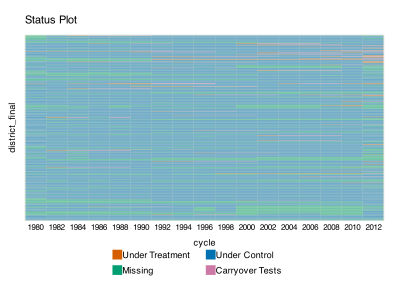
Note: most styling parameters (connected, plot.ci, pre.color/post.color, count.*) do not apply to status plots. Only axis, text size, and status-specific color parameters are relevant.
11.8.2 Factors and loadings plots
These plot types are available when the model is estimated with interactive fixed effects (method = "ife" or method = "gsynth"). We use simdata here because its data-generating process has two latent factors (\(r = 2\)), so the estimated factors and loadings reflect real structure rather than numerical artifacts. We fit an IFE model with two factors:
out_ife <- fect(Y ~ D + X1 + X2, data = simdata,
                index = c("id", "time"),
                method = "ife", r = 2, force = "two-way",
                se = TRUE, parallel = TRUE, cores = 16,
                nboots = 200)
#>
#>  +----------------------------------------------------------+
#>  | Parallel computing: using 16 of 20 available cores.      |
#>  |                                                          |
#>  | To change: set cores = <n> in fect().                    |
#>  | Default: min(available - 2, 8).                          |
#>  +----------------------------------------------------------+
The factors plot displays the estimated latent time factors. It uses the Okabe-Ito colorblind-safe palette with thinner lines for a clean, publication-ready appearance. Factor 0 (fixed effects, shown when include.FE = TRUE) appears in gray; subsequent factors appear in orange, blue, green, and so on. The factors plot always shows all estimated factors; nfactors applies to the loadings plot only.
plot(out_ife, type = "factors", main = "Estimated Latent Factors")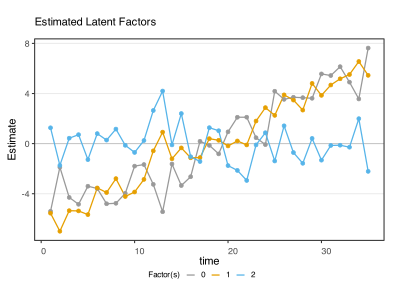
To exclude fixed effects from the plot, set include.FE = FALSE:
plot(out_ife, type = "factors", include.FE = FALSE,
     main = "Factors without Fixed Effects")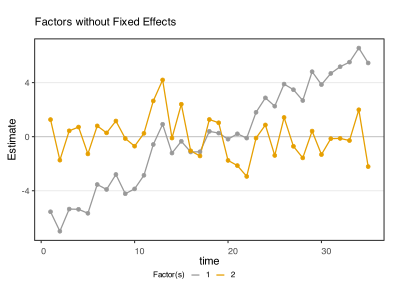
The loadings plot displays the estimated factor loadings, comparing the distribution across treated and control units. It uses a navy/crimson color scheme with smaller, semi-transparent scatter points for cleaner visualization. When multiple factors are estimated, the plot is rendered as a pairs matrix via GGally::ggpairs. Use nfactors to limit the number of factors whose loadings are shown (default: up to 4).
plot(out_ife, type = "loadings", main = "Factor Loadings")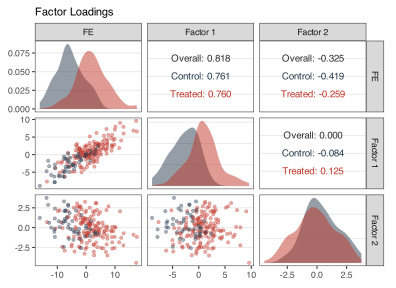
Note: connected, plot.ci, show.count, and most gap-plot styling parameters do not apply to factors or loadings plots.
11.9 Loading-Overlap Diagnostic
The loading.overlap plot is the companion diagnostic for the bounded-loadings feature in v2.3.0 (see Chapter 6 for the underlying simplex projection). It answers a single question that determines whether the GSC counterfactual for a treated unit is interpolated (safe) or extrapolated (risky): do treated units lie inside the support of the controls in factor space?
When a treated unit’s factor loadings \(\lambda_i\) lie inside the convex hull of control loadings \(\{\lambda_j : j \in \text{controls}\}\), the GSC counterfactual \(F \hat\lambda_i\) is a true interpolation: any prediction error reflects model misspecification, not extrapolation. When \(\lambda_i\) is outside the hull, the unbounded estimator extrapolates and the bounded estimator (loading.bound = "simplex") projects \(\lambda_i\) onto the hull boundary, leaving a residual loading.proj.resid that measures the extent of the projection. Large loading.proj.resid for a treated unit is a flag that GSC is being asked to predict outside the support of controls.
11.9.1 Two-dimensional case (\(r \geq 2\))
For models with \(r \geq 2\), the plot shows factors 1 and 2 with the convex hull of control loadings shaded in light blue and treated units overlaid as red triangles. Treated units inside the hull are exactly recoverable as convex combinations of controls; treated units outside the hull are projected onto the boundary by the bounded estimator and produce non-zero entries in loading.proj.resid.
plot(out_ife, type = "loading.overlap")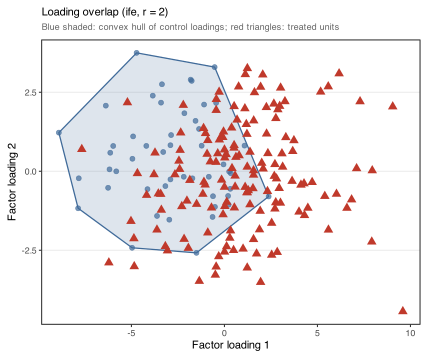
For \(r > 2\) the plot still shows only factors 1 and 2; the hull and overlap measure are computed on the full \(r\)-dimensional loading vectors, so the 2D scatter is a projection of the underlying multidimensional support check. Use factors = c(i, j) to view a different pair.
11.9.2 One-dimensional case (\(r = 1\))
For \(r = 1\), the same diagnostic is rendered as a mirror histogram: treated counts above the axis, control counts flipped below, with a vertical band marking the range of control loadings. The 1D analog of “outside the hull” is “outside the band.”
out_ife_r1 <- fect(Y ~ D + X1 + X2, data = simdata,
                   index = c("id", "time"), method = "ife", r = 1,
                   force = "two-way",
se = TRUE, parallel = TRUE, cores = 16, nboots = 500)plot(out_ife_r1, type = "loading.overlap")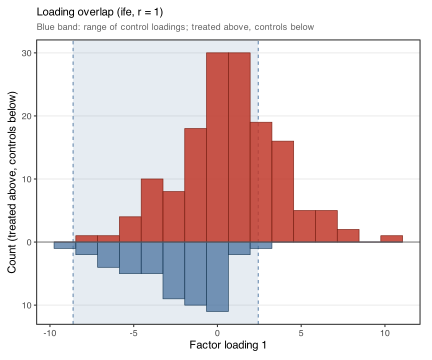
11.9.3 When to use it
-
Before deciding
loading.bound: the plot is informative even whenloading.bound = "none"— it shows whether the constraint would bind if activated. If most treated units are inside the hull, the constraint would have minimal effect; if many are outside, the constraint would meaningfully change the estimates. -
As an extrapolation flag: large
loading.proj.residpaired with treated units far outside the hull means GSC is extrapolating beyond what the donor pool supports. Such estimates should be reported with caveats or trimmed. -
As a model-fit diagnostic: a treated unit far outside the hull on multiple factors may indicate that the rank
rwas set too low, or that the treated unit has a structurally different factor exposure than any control.
The plot does not require loading.bound = "simplex" to be active, only that the model was fit with method = "ife" (with time.component.from = "nevertreated") or method = "gsynth". The hull and projection are computed on the estimated loadings regardless of how they were estimated.
11.10 Standalone esplot()
The esplot() function creates event study plots directly from a data frame or a fitted fect object, without requiring the full plot.fect dispatch. This is useful when you have pre-computed ATT estimates (e.g., from another package) and want publication-quality event study figures with the same styling as fect plots.
11.10.1 Basic usage with data frames
esplot() expects a data frame with columns for the time period, the point estimate, and optionally CI bounds and observation counts. By default, it looks for columns named "ATT", "CI.lower", and "CI.upper".
# Create example data from a fect result
es_data <- data.frame(Time = as.numeric(rownames(out$est.att)),
  ATT = out$est.att[, "ATT"],
  CI.lower = out$est.att[, "CI.lower"],
  CI.upper = out$est.att[, "CI.upper"]
)

esplot(es_data, Period = "Time",
       main = "Event Study Plot with esplot()",
       ylab = "Estimated ATT",
       xlab = "Periods Since Treatment",
       xlim = c(-15, 5), ylim = c(-0.3, 0.7))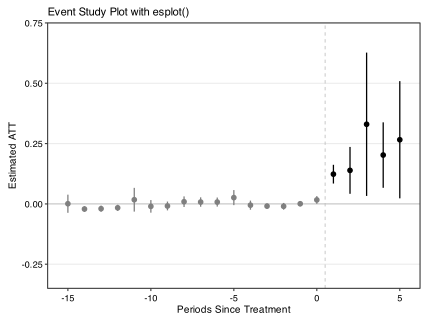
11.10.2 Using fect objects directly
When you pass a fect object directly to esplot(), it automatically extracts the ATT estimates and treated unit counts. This is the simplest usage:
esplot(out, main = "Direct from fect object")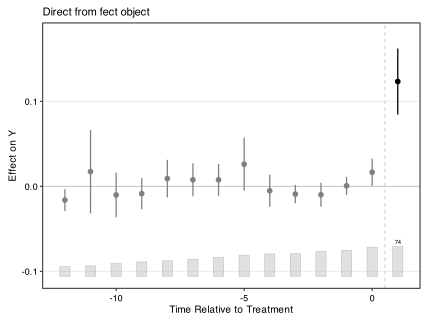
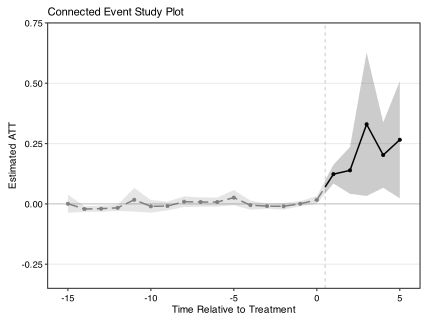
11.10.3 Connected line style
Setting connected = TRUE displays estimates as a connected line with a confidence band:
11.10.4 Highlighting periods
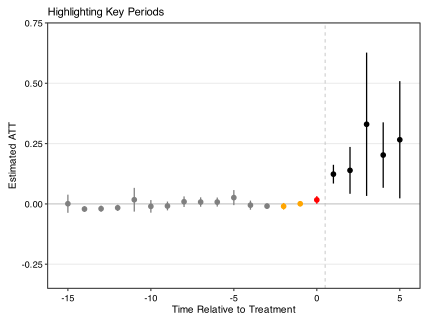
The highlight.periods argument highlights specific time periods, which is useful for drawing attention to placebo or treatment windows. highlight.colors is paired element-wise with highlight.periods — the i-th color is applied to the i-th period. Multiple periods can share a color, in which case they appear in the same hue but are still listed separately so each gets its own background rectangle.
In the example below, three periods are highlighted with two distinct colors: periods -2 and -1 in orange, and period 0 in red. Each highlighted point sits on a lighter-shade rectangle of the same hue (auto-derived from highlight.colors).
11.10.5 Count bar behavior
When you pass a fect object to esplot(), count bars appear by default because the function auto-extracts treated unit counts from the object:
esplot(out) # count bars shown automaticallyWhen passing a data frame, you must include a count column and specify its name:
esplot(df, Count = "n_treated")If no count data is available, show.count silently degrades to FALSE—no error is thrown, but count bars are not displayed. Set show.count = FALSE to suppress count bars explicitly regardless of data availability.
11.11 Shared Parameters Reference
11.11.1 Legend behavior
Legends appear automatically when multiple visual encodings are present (e.g., shape markers from placebo or carryover tests). The dashed/solid pre-treatment vs. post-treatment line distinction does not generate a legend entry, as this convention is standard in causal inference plots. Use legendOff = TRUE to suppress all legends. Use legend.pos to control placement (default is "bottom" for shape legends).
11.11.2 Parameter applicability table
The table below summarizes which parameters apply to each plot type. Parameters not listed are either universal (e.g., main, theme.bw) or internal.
| Parameter | gap | equiv | exit | box | calendar | counterfactual | status | factors | loadings | esplot |
|---|---|---|---|---|---|---|---|---|---|---|
bound / tost.threshold
|
— | Yes | — | — | — | — | — | — | — | — |
carryover.color |
— | — | Yes | — | — | — | — | — | — | — |
cex.main / cex.axis / cex.lab
|
Yes | Yes | Yes | Yes | Yes | Yes | Yes | Yes | — | Yes |
ci.outline |
Yes | Yes | Yes | — | — | Yes | — | — | — | Yes |
color |
Yes | Yes | Yes | — | — | Yes | — | — | — | Yes |
connected |
Yes | Yes | Yes | — | — | — | — | — | — | Yes |
count.color / count.alpha
|
Yes | Yes | Yes | — | — | Yes | — | — | — | Yes |
counterfactual.color |
— | — | — | — | — | Yes | — | — | — | — |
est.lwidth / est.pointsize
|
Yes | Yes | Yes | — | — | — | — | — | — | Yes |
gridOff |
Yes | Yes | Yes | Yes | Yes | Yes | — | Yes | — | Yes |
highlight.periods / highlight.shapes
|
— | — | — | — | — | — | — | — | — | Yes |
id |
Yes | — | — | — | — | Yes | Yes | — | — | — |
include.FE |
— | — | — | — | — | — | — | Yes | Yes | — |
lcolor / lwidth / ltype
|
Yes | Yes | Yes | Yes | Yes | Yes | — | Yes | — | Yes |
legendOff |
Yes | Yes | Yes | — | — | Yes | — | — | — | Yes |
nfactors |
— | — | — | — | — | — | — | — | Yes | — |
placebo.color |
Yes | — | — | — | — | — | — | — | — | — |
plot.ci |
Yes | Yes | Yes | — | — | Yes | — | — | — | — |
pre.color / post.color
|
Yes | Yes | Yes | — | — | — | — | — | — | Yes |
preset |
Yes | Yes | Yes | — | — | — | — | — | — | — |
proportion |
Yes | Yes | Yes | Yes | — | — | — | — | — | Yes |
raw |
— | — | — | — | — | Yes | — | — | — | — |
show.count |
Yes | Yes | Yes | — | — | Yes | — | — | — | Yes |
start0 |
Yes | Yes | Yes | — | — | — | — | — | — | Yes |
stats / stats.pos / show.stats
|
Yes | Yes | Yes | — | — | — | — | — | — | Yes |
status.*.color |
— | — | — | — | — | — | Yes | — | — | — |
xbreaks / ybreaks
|
Yes | Yes | Yes | Yes | Yes | Yes | — | — | — | Yes |
xlim / ylim
|
Yes | Yes | Yes | Yes | Yes | Yes | — | Yes | — | Yes |
11.12 Estimation sample via panelView
Every fect fit returns a logical matrix $sample indicating which cells the estimator actually consumed. The matrix is the same shape as the panel; a cell is true when it entered the main fit, a placebo or carryover test, or a balance check, and false when it was missing, dropped, or excluded by carryover.rm. panelView consumes this matrix directly via its panelview(fit) entry-point, so visualizing the estimation sample takes one call:
panelview(fit, type = "treat", by.timing = TRUE,
          axis.lab = "off", display.all = TRUE,
          gridOff = TRUE, xlab = "", ylab = "")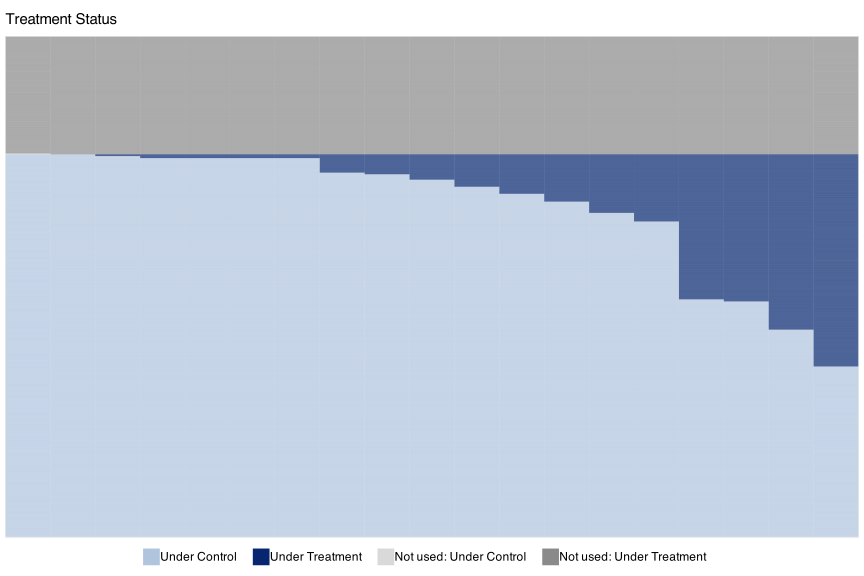
The figure splits into three bands. At the top sits a dark-grey block of roughly 285 municipalities that were already treated when the panel begins; they have no pre-treatment period and fect drops them silently. Without the sample overlay these dropped municipalities would be invisible. Below that is a dark-blue staircase of the units fect actually fits, ordered by treatment onset. The broad light-blue band at the bottom is the never-treated controls.
For a layout that puts the in-sample band on top instead, pair sample.sort = TRUE with by.timing = TRUE: in-sample units rise to the top, ordered by treatment timing within, and the dropped band falls to the bottom.
The same fit can be passed to sample = inside the explicit-data signature if you prefer to control the data argument yourself. The panelView manual chapter on Treatment Status covers the full surface, including the sample-alignment rules, the four sample-sort × by-timing combinations, and the named-slot syntax for fine-grained palette overrides.
11.13 How to Cite
If you find these methods and visualization tools helpful, you can cite Liu, Wang, and Xu (2024).
@article{LWX2024,
  title = {A Practical Guide to Counterfactual Estimators for Causal Inference with Time-Series Cross-Sectional Data},
  author = {Liu, Licheng and Wang, Ye and Xu, Yiqing},
  journal = {American Journal of Political Science},
  volume = {68},
  number = {1},
  pages = {160--176},
  year = {2024}
}