2 The Imputation Estimator
In this chapter, we illustrate how to use the fect package to implement counterfactual estimators (or imputation estimators) and conduct diagnostic tests proposed by L. Liu, Wang, and Xu (2024, Paper). R script used in this chapter can be downloaded here.
2.1 Simulated data
In this chapter, we use sim_base, a simulated panel dataset in which the parallel trends assumption holds. The dataset has 200 units, 35 time periods, and treatment that switches on and off. The data are simulated with treatment switching on and off, capturing the general case of treatment reversal under strict exogeneity. The outcome is generated from a two-way fixed effects model with two covariates: \[Y_{it} = \tau_{it} D_{it} + \beta_1 X_{1,it} + \beta_2 X_{2,it} + \alpha_i + \xi_t + \epsilon_{it}\]
Since there are no latent factors, the "fe" method (two-way fixed effects counterfactual estimator, or FEct) is correctly specified for this DGP. For settings where latent factors are present and the FE estimator is biased, see Chapter 4.
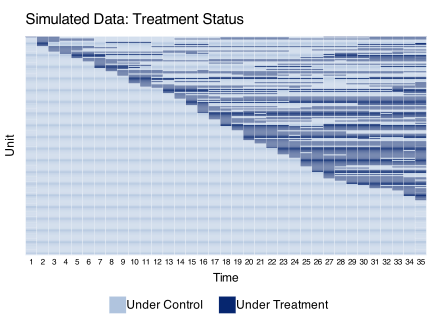
We use the panelView package to visualize the treatment and outcome variables:
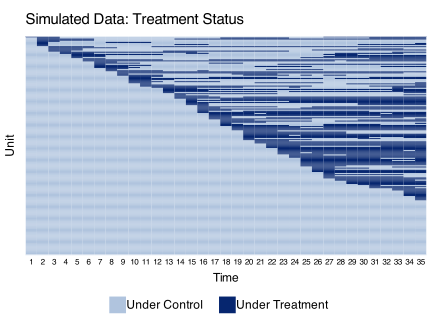
In the figure below, blue and gray represent treatment and control conditions.
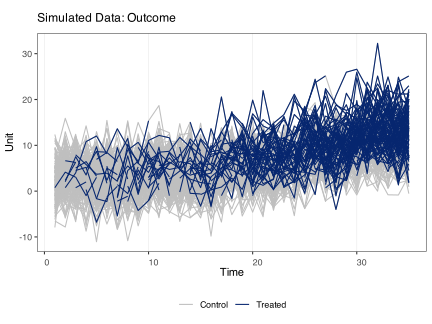
2.2 The FEct estimator
The two-way fixed effects counterfactual (FEct) estimator imputes the counterfactual outcome \(\hat{Y}(0)\) for treated observations using a two-way fixed effects model estimated on control observations. It is also independently proposed by Borusyak, Jaravel, and Spiess (2024) and Gardner (2021), who refer to it as the “imputation method” and “two-stage DID,” respectively.
2.2.1 Estimation
We estimate the average treatment effect on the treated (ATT) using the following information: the outcome variable \(Y\), binary treatment variable \(D\), two observed covariates \(X_{1}\) and \(X_{2}\), and the unit and time indicators \(id\) and \(time\), respectively.
The first variable on the right hand side of the formula is the treatment indicator \(D\); the rest of the right-hand-side variables serve as controls. The index option specifies the unit and time indicators. The force option (“none”, “unit”, “time”, and “two-way”) specifies the additive component(s) of the fixed effects included in the model. The default option is “two-way” (including both unit and time fixed effects).
The formula takes bare column names only. Terms such as log(Y), factor(g), X1:X2 or I(X^2) stop with an error; create the column first and put its name in the formula. Covariates must be numeric: a factor, character or Date covariate stops, so convert it to numeric columns first, such as dummy columns for a factor (a logical covariate is used as 0/1). Give the covariates either in the formula or in X, not both. A covariate that is a linear combination of other covariates, or that the fixed effects absorb, is dropped with a warning and gets an NA coefficient; before 2.4.7 such covariates could change the estimates without a message. A factor time index is used in the order of its levels, with a warning when the levels are numbers out of numeric order, and a character time index must hold numbers. Before 2.4.7 both were sorted as text (“1”, “10”, “2”, …), which scrambled event time.
out.fect <- fect(Y ~ D + X1 + X2, data = sim_base, index = c("id","time"),
method = "fe", force = "two-way")The key parameters that control the model are: method (estimator choice), force (fixed effects structure), and r (number of factors for IFE/MC methods; see Chapter 4; by default, r is set to 0 when method = "fe"). These determine how \(\hat{Y}(0)\) is imputed.
We can use the plot function to visualize the estimation results. By default, it produces a “gap” plot — plot(out.fect, type = "gap") — which shows the estimated period-wise ATT (dynamic treatment effects). The true population average effects in sim_base go from 1 to 3 from the 1st to the 10th post-treatment period.
plot(out.fect, main = "Estimated ATT (FEct)", ylab = "Effect of D on Y")
#> Uncertainty estimates not available.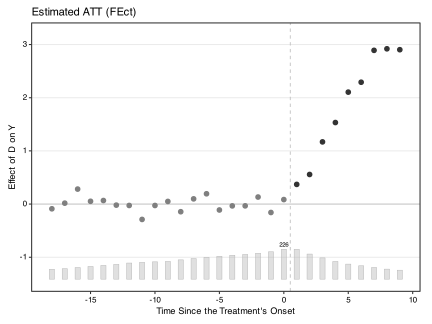
In the gap plot, pre-treatment estimates appear in gray (in-sample) while post-treatment estimates appear in black (out-of-sample). This visual distinction highlights that pre-treatment “effects” should be near zero if the model is well-specified, while post-treatment effects are the quantities of interest. When loo = TRUE is used in the plot call, all points appear in black because both pre- and post-treatment estimates are out-of-sample. The uncertainty estimates are unavailable in the plot above because, by default, se = FALSE to save computational power. See Chapter 11 for more visualization options.
2.2.2 Inference
The package can produce uncertainty estimates when se = TRUE. The default is the non-parametric cluster-bootstrap (vartype = "bootstrap"), which works well when the number of units is relatively large and many units experience the treatment condition. Switch to vartype = "jackknife" (leave-one-unit-out) when the number of treated units is small (single digits). The number of bootstrap runs is set by nboots and the clustering variable by cl (default "id").
A third option, vartype = "parametric", is intended for the synthetic-control regime where the number of treated units is small and the nonparametric bootstrap is unreliable; it has its own assumptions and gates. That setting and the deeper discussion of bootstrap-distribution semantics, confidence-interval methods (ci.method), p-values, and an empirical coverage study live in Chapter 7.
Parallel computing will speed up both cross-validation and uncertainty estimation significantly. We recommend that users manually set the number of cores using the cores option. If this is not supplied or is NULL, we will automatically select the smaller of 8 and the number of usable system cores minus 2, to prevent excessive use of system resources.
The parallel argument accepts five forms, allowing users to enable parallelism for cross-validation and the bootstrap independently:
| Value | CV | Bootstrap |
|---|---|---|
TRUE (default) |
Parallel (subject to auto-threshold) | Parallel |
FALSE |
Serial | Serial |
"cv" |
Parallel (overrides threshold) | Serial |
"boot" |
Serial | Parallel |
c("cv", "boot") |
Parallel | Parallel |
When parallel = TRUE, CV parallelism auto-engages only on panels above a method-specific size threshold (see Chapter 4 for the CV thresholds). The string forms "cv" and "boot" bypass the threshold — useful when the user knows their panel will benefit from parallelism even at smaller sizes.
Clustering.
- By default,
fect()uses cluster-bootstrap at theunitlevel whense = TRUE, that isvartype = "bootstrap". The uncertainty estimates thus account for arbitrary serial correlation within a unit over time—commonly understood as being “clustered” at the unit level. In the example above, the unit isid, hence, by default,cl = "id". - To cluster standard errors at a different, usually higher, level, users can specify the clustering variable using the
cloption.clmust name one column. For the cluster bootstrap it must be constant within each unit and take at least two values. Since 2.4.7 aclthat varies within a unit or has only one value stops with an error; before, it gaveNAor zero standard errors. - Alternatively, users can obtain uncertainty estimates using the cluster-jackknife method by specifying
vartype = "jackknife", also at the unit level (cl, if different fromunit, will be ignored). In this case, the algorithm calculates standard errors by iteratively dropping one unit (i.e., the entire time series) from the dataset. This can be particularly useful when the number of treated units is small.
out.fect <- fect(Y ~ D + X1 + X2, data = sim_base, index = c("id","time"),
  method = "fe", force = "two-way", se = TRUE,
  parallel = TRUE, cores = 16, nboots = 1000)
The plot() function can visualize the estimated period-wise ATTs as well as their uncertainty estimates. stats = "F.p" shows the p-value for the F test of no-pretrend.
plot(out.fect, main = "Estimated ATT (FEct)", ylab = "Effect of D on Y",
  stats = "F.p")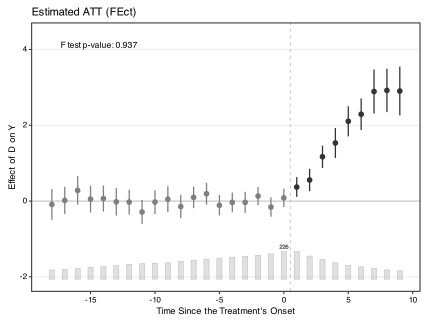
2.2.3 Exiting the treatment
fect allows the treatment to switch back and forth and provides diagnostic tools for this setting. After the estimation, we can visualize the period-wise ATTs relative to the exit of treatments by setting type = "exit". The x-axis is then realigned based on the timing of the treatment’s exit, not onset, e.g., 1 represents 1 period after the treatment ends. In the exit plot, the color convention is reversed: pre-exit estimates appear in black (out-of-sample) and post-exit estimates appear in gray (in-sample).
plot(out.fect, type = "exit", main = "Exit Plot (FEct)")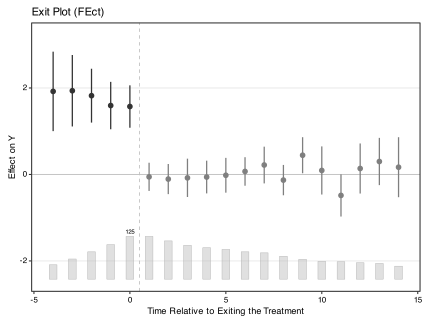
2.2.4 Save estimates
Users can use the print function to view a summary of the estimation results or retrieve relevant statistics by directly accessing the fect object. Specifically, est.avg and est.avg.unit show the ATT averaged over all periods – the former weights each treated observation equally while the latter weights each treated unit equally. beta reports the coefficients of the time-varying covariates. est.att reports the average treatment effect on the treated (ATT) by period.
print(out.fect)
#> Call:
#> fect.formula(formula = Y ~ D + X1 + X2, data = sim_base, index = c("id",
#>     "time"), force = "two-way", method = "fe", se = TRUE, nboots = 1000,
#>     parallel = TRUE, cores = 16)
#>
#> Estimator:    fe
#> Fixed effects: id (unit) + time (time)
#>
#> ATT:
#>                             ATT   S.E. CI.lower CI.upper p.value
#> Tr obs equally weighted   2.431 0.1689    2.100    2.762       0
#> Tr units equally weighted 1.608 0.1434    1.327    1.889       0
#>
#> Covariates:
#>     Coef    S.E. CI.lower CI.upper p.value
#> X1 1.002 0.02812   0.9465    1.057       0
#> X2 2.973 0.02591   2.9223    3.024       0
To save space, results are not shown here.
out.fect$est.att
out.fect$est.avg
out.fect$beta
Standard errors for the period-wise ATTs are available in the output object alongside the point estimates. To also keep the cell-level treatment effects from each bootstrap run, set keep.sims = TRUE: they are stored in eff.boot, an array whose dimension = (#time periods * #units * #bootstrap runs). Slice b holds the units that run b drew, in the order colnames.boot[[b]] (their column positions in the data), so a unit drawn twice appears twice.
out.fect$eff.bootFor IFE and MC methods, see Chapter 4.
2.3 Diagnostics
Once we have point estimates and uncertainty estimates, we conduct diagnostic checks before interpreting results. This section covers the placebo test, the carryover test, and the leave-one-out approach.
2.3.1 Placebo test
We provide a placebo test for a settled model by setting placeboTest = TRUE. We specify a range of pretreatment periods as “placebo periods” in option placebo.period to remove observations in the specified range for model fitting, and then test whether the estimated ATT in this range is significantly different from zero. Below, we set c(-2, 0) as the placebo periods.
plot(out.fect.placebo)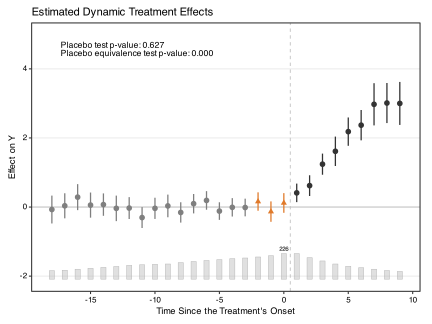
By default the placebo periods render as orange triangles on a plain panel. Pass highlight.fill = TRUE to add a lightened-tone background rectangle behind the placebo window — useful for slide / talk figures where the rectangle helps a remote audience locate the window. Pass highlight = FALSE to suppress the highlight entirely and render every period as a plain pre/post circle.
plot(out.fect.placebo, highlight.fill = TRUE)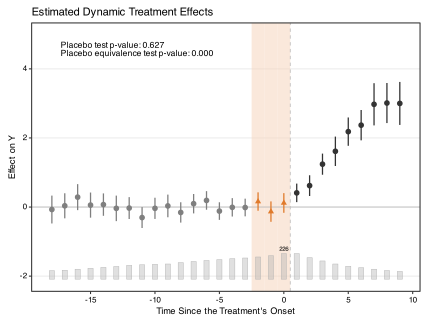
For more detail on placebo tests, including IFE and MC examples, see Chapter 4.
2.3.2 Carryover test
The idea of the placebo test can be extended to testing the presence of carryover effects. Instead of hiding a few periods right before the treatment starts, we hide a few periods right after the treatment ends. If carryover effects do not exist, we would expect the average prediction error in those periods to be close to zero.
To perform the carryover test, we set carryoverTest = TRUE and specify the range of exit-treatment periods in carryover.period. Below, we set carryover.period = c(1, 3). Since sim_base is simulated without carryover effects, we expect the test to pass.
plot(out.fect.carry, type = "exit", main = "Carryover Effects (FEct)")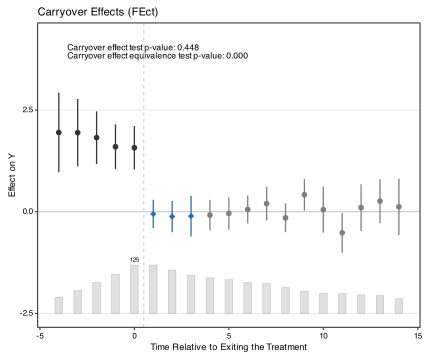
By default, the three carryover-test periods render as blue diamonds on a plain panel. The same highlight / highlight.fill controls used in the placebo plot apply here.
To draw a lightened-tone background rectangle behind the carryover window (useful for slide / talk figures where the rectangle helps locate the window), set highlight.fill = TRUE:
plot(out.fect.carry, type = "exit",
     highlight.fill = TRUE,
     main = "Carryover Effects (FEct), with rectangle")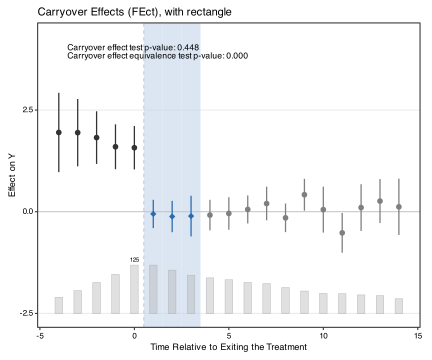
When the fit has multiple test types active at once (e.g., both carryoverTest = TRUE and a non-zero carryover.rm), the accent treatment can be restricted to one of them via highlight = "carryover" or highlight = "carryover.rm". The unselected type then renders as plain pre/post circles. See Chapter 4 for a worked carryover.rm example, and Chapter 11 for the full table of highlight patterns.
To suppress the highlight entirely (every period rendered as a plain pre/post circle), pass highlight = FALSE:
plot(out.fect.carry, type = "exit",
     highlight = FALSE,
     main = "Carryover Effects (FEct), no highlight")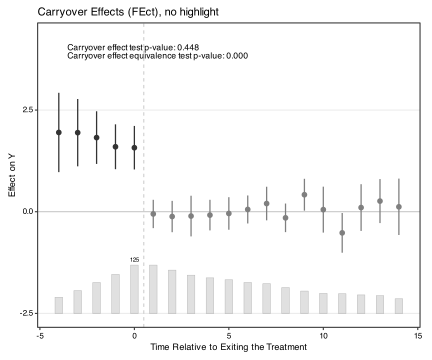
For more detail on carryover tests with IFE and MC, see Chapter 4.
2.3.3 Leave-one-out approach
Li and Strezhnev (2025) show that in some applications, pre-trend estimates based on in-sample model fit can lead to the mistaken belief that no pre-trend exists, even when a non-parallel pre-trend is present. A simple fix is to use a leave-one-out method by setting loo = TRUE to obtain these estimates, although it re-fits the model once per pre-treatment period and is therefore much more time-consuming. Under staggered adoption, the double leave-one-out placebos of the next section (dloo = TRUE) give the corrected estimates without any re-fitting.
We recommend setting loo = TRUE when (i) the event-study plot is intended as a critical piece of evidence to support the parallel trends assumption, which is often the case, or (ii) when implementing an equivalence test for the pre-trend estimates. For more discussion on the LOO pre-trend test, see Chapter 4.
Our most preferred tests, however, are the placebo test described above and the sensitivity analysis discussed in Chapter 10, which combines out-of-sample placebo estimates with post-treatment ATT estimates, but it requires a lot of power.
We can implement the leave-one-out pre-trend test by setting loo = TRUE.
out.fect.loo <- fect(Y ~ D + X1 + X2, data = sim_base, index = c("id","time"),
  method = "fe", force = "two-way", se = TRUE, loo = TRUE,
  parallel = TRUE, cores = 16, nboots = 1000)
The event study plot with leave-one-out pre-treatment estimates is shown below; pass loo = TRUE to plot() as well, otherwise the in-sample estimates are drawn. All points are now black, since every estimate is out of sample. Without a type, a fit with leave-one-out placebos plots the equivalence view, so type = "gap" is set explicitly. This graph is fairly similar to the one presented earlier without leave-one-out. However, this is not always true.
plot(out.fect.loo, loo = TRUE, type = "gap", main = "Estimated ATT (FEct) -- LOO")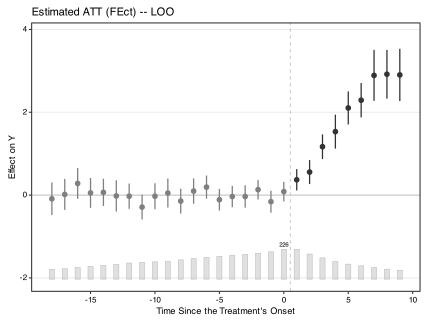
2.3.4 Double leave-one-out placebos
Under staggered adoption, Li and Strezhnev (2025) show that the in-sample placebo has two problems. First, it is attenuated: the tested period helps estimate the unit’s own fixed effect, so the residual at that period is pulled toward zero. Second, it is contaminated: cohorts that adopted earlier serve as controls for a later cohort’s pre-treatment periods while they are already treated. The leave-one-out approach above removes the first problem by re-fitting the model once per pre-treatment period. Their proposed fix, the double leave-one-out placebo, removes both. For a cohort adopting at period \(g\) and a pre-treatment period \(t\), it drops period \(t\) and compares that cohort only with units that adopt strictly later or never, as a two-by-two difference in means. Because unit and time fixed effects cancel in that difference, the estimator is a fixed linear function of the in-sample placebos that fect already computes. It therefore costs nothing beyond the original fit. Covariates do not cancel in the same way, so with covariates fect re-estimates their coefficients for each cohort and tested period on that comparison sample: the cohort’s other pre-treatment periods, and the later-adopting and never-treated units before the cohort adopts. Data from later periods therefore do not affect the placebos. Anton Strezhnev contributed the implementation; set dloo = TRUE in fect() to use it.
dloo applies
dloo requires additive two-way fixed effects (method = "fe"), staggered adoption with no treatment reversal, and a balanced pre-treatment panel (post-treatment cells may be missing). Standard errors come from the package’s own bootstrap or jackknife (vartype = "bootstrap" or "jackknife"). It cannot be combined with loo, placeboTest, carryoverTest or permute. The datasets shipped with the package either allow reversal or have a single cohort, so the example below simulates a small staggered panel.
We simulate three adoption cohorts (periods 8, 12, and 16) plus a never-treated group, with unit and time fixed effects, a constant treatment effect of 1.5, and no violation of parallel trends.
set.seed(2026)
TT <- 20; cohorts <- c(8, 12, 16, Inf); n_per <- 40
xi <- rnorm(TT)
sim_stag <- do.call(rbind, lapply(seq_along(cohorts), function(k) {
  g <- cohorts[k]
  do.call(rbind, lapply(seq_len(n_per), function(u) {
    d <- as.integer(is.finite(g) & seq_len(TT) >= g)
    data.frame(id = (k - 1) * n_per + u, time = seq_len(TT),
               Y = rnorm(1) + xi + 1.5 * d + rnorm(TT, 0, 0.8), D = d)
  }))
}))
The call mirrors the leave-one-out fit above, with dloo = TRUE in place of loo = TRUE. The double leave-one-out placebos fill the same slots (pre.est.att, pre.att.bound, pre.att.boot), and the joint tests on them are stored in dloo.test.out.
out.fect.dloo <- fect(Y ~ D, data = sim_stag, index = c("id", "time"),
  method = "fe", force = "two-way", se = TRUE, nboots = 200,
  parallel = TRUE, cores = 16, dloo = TRUE)
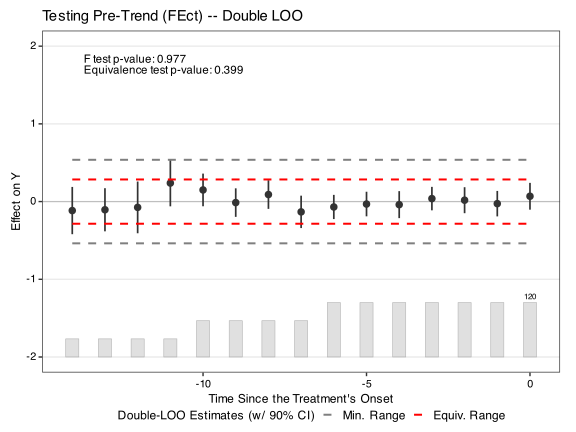
Set dloo = TRUE in plot() to display them. The legend reads “Double-LOO Estimates”, and all points are black because every pre-treatment estimate is now out of sample. As with loo, the default view is the equivalence plot, so type = "gap" is set explicitly for the event-study plot.
plot(out.fect.dloo, dloo = TRUE, type = "gap",
     main = "Estimated ATT (FEct) -- Double LOO")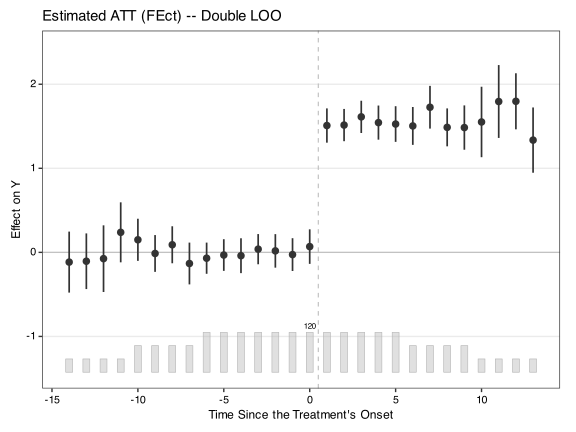
The equivalence plot and the joint pre-trend tests of Chapter 4 work on these placebos in the same way. Here the \(F\) test does not reject the null of no pre-trend (p = 0.98). The equivalence test does not reject non-equivalence either (p = 0.40): the four earliest periods rest on the last cohort alone (40 units, see the count bars), and their intervals are too wide for the default equivalence range. Both readings are consistent with the data-generating process, which has no violation.
The difference between two double leave-one-out placebos overstates the period-to-period change in a parallel-trends violation by the factor \((g-1)/(g-2)\), because each placebo has its own leave-one-out baseline. Z. Liu (2025) instead uses the average over all pre-treatment periods, including the tested one, as the baseline. Setting dloo.adjust = TRUE selects that version, which equals the double leave-one-out placebo rescaled by \((g-2)/(g-1)\) for a cohort adopting at period \(g\). Use it when the question is how a violation changes from one period to the next rather than its level in a given period.
out.fect.dloo.adj <- fect(Y ~ D, data = sim_stag, index = c("id", "time"),
  method = "fe", force = "two-way", se = TRUE, nboots = 200,
parallel = TRUE, cores = 16, dloo = TRUE, dloo.adjust = TRUE)plot(out.fect.dloo.adj, dloo = TRUE, type = "gap",
main = "Estimated ATT (FEct) -- Double LOO, adjusted baseline")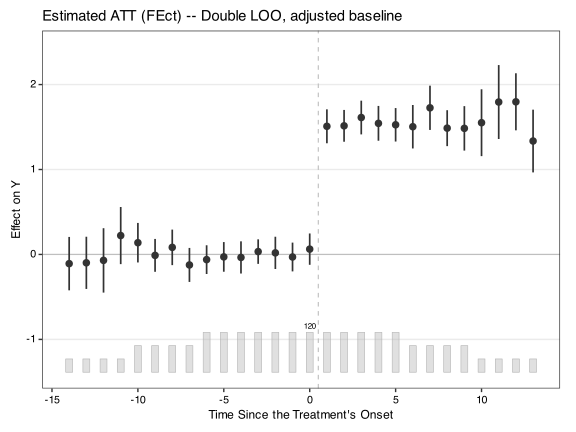
2.4 Other estimands
Beyond the standard ATT, fect supports several estimand variants: the cumulative effects, the balanced treated sample ATT (estimated only on treated units with complete data in a specified window), the average cohort treatment effect (estimated separately for each cohort of treatment adoption), and user-supplied weighted ATTs (where a user-provided weight column is applied to the across-treated-obs aggregation).
2.4.1 Cumulative effects
Cumulative treatment effects through each event time, and over a specified window, are computed via the unified post-hoc estimand interface introduced in v2.4.0. Both the per-event-time series and the overall window form are one-line calls. See Chapter 3 for the full surface, worked examples, and the migration table from the legacy effect() and att.cumu() functions.
2.4.2 Balanced treated sample
fect also provides the option balance.period, which allows the calculation of the average treatment effects only for treated units that exhibit complete data in specified pre- and post-treatment periods. For instance, if the option is set to balance.period = c(-3,4), the algorithm will calculate the average treatment effects for units that have at least four consecutive non-missing observations in the pre-treatment periods (-3, -2, -1, 0) and at least four consecutive non-missing observations in the post-treatment periods (1, 2, 3, 4). Note that this option does not affect whether a never-treated unit enters estimation.
out.bal <- fect(Y ~ D + X1 + X2, data = sim_base, index = c("id","time"),
  balance.period = c(-3, 4), force = "two-way", method = "ife",
  CV = FALSE, r = 2, se = TRUE, nboots = 1000, parallel = TRUE, cores = 16)
#>
#>  +----------------------------------------------------------+
#>  | Parallel computing: using 16 of 20 available cores.      |
#>  |                                                          |
#>  | To change: set cores = <n> in fect().                    |
#>  | Default: min(available - 2, 8).                          |
#>  +----------------------------------------------------------+
We can then visualize the dynamic treatment effects using the inbuilt function plot. By default, it displays the dynamic treatment effects of the “balanced” sample.
plot(out.bal, main = "Estimated ATT (Balanced Sample)")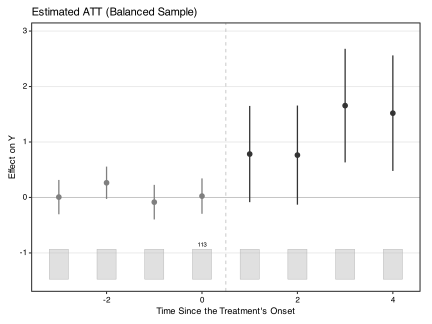
The usual plotting options can be used to adjust the balanced plot as well.
plot(out.bal, main = "Estimated ATT (Balanced Sample)",
  post.color = "red", count.color = "blue")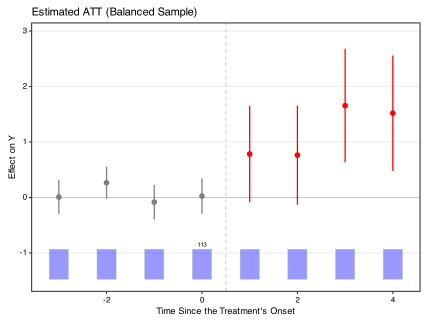
2.4.3 Average cohort treatment effect
fect allows us to estimate and visualize the ATTs for sub-groups of treated units. For example, it can draw the gap plot for units that adopt the treatment at the same time under staggered adoption, which is defined as “Cohort” in Sun & Abraham (2021). Our simulated dataset is not ideal to demonstrate this functionality because the treatment switches on and off. To improve feasibility, we define a cohort as a group of treated units that first adopt the treatment at the same time.
The get.cohort() function can generate a new variable “Cohort” based on the timing when treated units first get treated.
sim_base.cohort <- get.cohort(data = sim_base,D = 'D',index = c("id","time"))
print(table(sim_base.cohort[,'Cohort']))
#>
#>  Cohort:1 Cohort:10 Cohort:11 Cohort:12 Cohort:13 Cohort:14 Cohort:15 Cohort:16
#>        35       245       105        35       175       175       210       245
#> Cohort:17 Cohort:18 Cohort:19  Cohort:2 Cohort:20 Cohort:21 Cohort:22 Cohort:23
#>       210       210       140       280       315       105       140       210
#> Cohort:24 Cohort:25 Cohort:26 Cohort:27 Cohort:28 Cohort:29  Cohort:3 Cohort:30
#>       105       280       175       210        70       105       175        35
#> Cohort:31 Cohort:33 Cohort:34 Cohort:35  Cohort:4  Cohort:5  Cohort:6  Cohort:7
#>       105        70       175       140        70       140       105       210
#>  Cohort:8  Cohort:9   Control
#>       105       140      1750
We can also pass a list of intervals for first get-treated time into the entry.time option of get.cohort(). For example, we can categorize all treated units into the group that adopts the treatment between time 21 and 27, and the group that adopts the treatment in time 30 and 33.
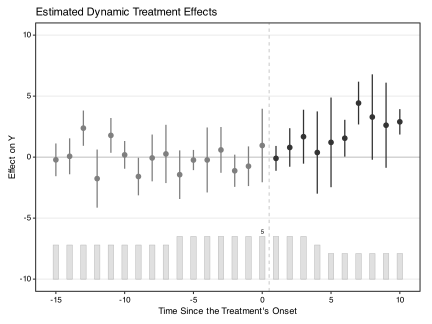
By setting the option group = "Cohort", fect estimates the ATT for each specified sub-group and saves it for further visualization.
out.fe.g <- fect(Y ~ D + X1 + X2, data = sim_base.cohort, index = c("id","time"),
          force = "two-way", method = "fe",
          se = TRUE, nboots = 1000, parallel = TRUE, cores = 16, group = 'Cohort')
Then one can draw the gap plot for each sub-group. Here we present the gap plot for Cohort 22.
2.4.4 User-supplied weights
Passing a weight column via W produces a weighted ATT. When W is supplied, every reported quantity on the returned fit object reflects those weights: print(fit), plot(fit), fit$est.att, fit$est.avg, and the bootstrap surfaces all carry the same W-weighted aggregation. So do estimand() and effect(), which aggregate with the weights stored in fit$W.agg.
sim_base$Weight <- abs(rnorm(n = dim(sim_base)[1]))
out.w <- fect(Y ~ D + X1 + X2, data = sim_base, index = c("id","time"),
  force = "two-way", method = "ife", W = 'Weight',
  CV = FALSE, r = 2, se = TRUE, nboots = 1000, parallel = TRUE, cores = 16)
#>
#>  +----------------------------------------------------------+
#>  | Parallel computing: using 16 of 20 available cores.      |
#>  |                                                          |
#>  | To change: set cores = <n> in fect().                    |
#>  | Default: min(available - 2, 8).                          |
#> +----------------------------------------------------------+plot(out.w, main = "Estimated Weighted ATT")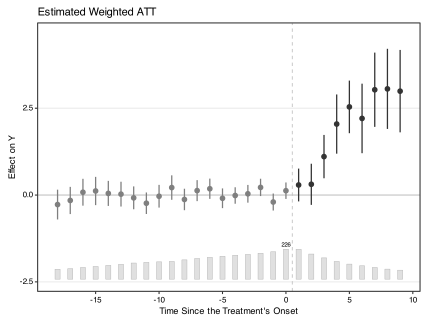
For finer control — separating the weight that enters the outcome-model fit (W.est) from the weight that enters the aggregation (W.agg) — and for important caveats when the weight is an inverse-probability weight, see Chapter 4 §Weights.
2.4.5 Post-hoc estimands
The fit object exposes the full imputed counterfactual surface, so users can compute estimands beyond the default level-scale ATT directly from the fit. fect v2.4.0 ships a typed dispatcher estimand() for the common cases — APTT (Chen and Roth 2024), log-scale ATT, cumulative ATT, window-restricted ATT — plus a low-level accessor imputed_outcomes() for custom estimands the dispatcher does not ship. See Chapter 3 for the full chapter with worked examples and the migration table from effect() / att.cumu().
2.5 Higher-level FE: group.fe for sub-group treatment
When units are nested inside groups and treatment varies at the group level — counties in states with a state policy, students in schools with a school-wide intervention — the unit FE \(\alpha_i\) is often too granular and absorbs the very dynamics the user wants to study. The natural alternative is to absorb FE at the group level instead, while keeping the individual rows for any individual-level covariates and residual degrees of freedom.
index = c("id", "time") must still uniquely identify each row. group.fe is a coarsening of index[1] (each unit belongs to one group), not a replacement.
The group.fe argument (v2.4.5+) names this pattern. The implied model is:
\[Y_{it}^{0} = \xi_t + \omega_{g(i)} + e_{it}\]
with \(\omega_{g(i)}\) the state FE and force = "time" skipping the county FE.
2.5.1 Worked example
set.seed(42)
N <- 40; TT <- 10
df_county <- expand.grid(id = 1:N, time = 1:TT)
df_county$state <- paste0("S", (df_county$id - 1) %% 4 + 1)
df_county$D     <- as.integer(df_county$state %in% c("S1", "S2") &
                              df_county$time >= 6)
df_county$Y     <- 1 + 0.5 * df_county$D + rnorm(nrow(df_county), sd = 0.5)

fit_gfe <- fect(Y ~ D, data = df_county,
                index    = c("id", "time"),
                group.fe = "state",
                force    = "time",     # no county FE
se = TRUE, nboots = 200, parallel = FALSE)print(fit_gfe)
#> Call:
#> fect.formula(formula = Y ~ D, data = df_county, index = c("id",
#> "time"), force = "time", se = TRUE, nboots = 200, parallel = FALSE,
#> group.fe = "state")
#>
#> Estimator: fe
#> Fixed effects: time (time) + state
#> Cluster SE: state
#>
#> ATT:
#> ATT S.E. CI.lower CI.upper p.value
#> Tr obs equally weighted 0.3744 0.1101 0.1586 0.5901 0.000672
#> Tr units equally weighted 0.3744 0.1101 0.1586 0.5901 0.000672The header surfaces three facts: Estimator: fe (no factors), Fixed effects: time (time) + state (state, not county), Cluster SE: state (auto-defaulted).
2.5.2 Cluster SE
When group.fe is a single column, cl auto-defaults to it. This matches the standard recommendation to cluster at the treatment-assignment level (Bertrand, Duflo & Mullainathan 2004): the effective \(n\) for the treatment SE is the number of states, not counties. Override by passing cl explicitly to any other column — e.g., cl = "id" for unit-level clustering, or cl = "region" for a different group level. Note that fect’s case bootstrap always resamples units regardless of cl; the cl argument only sets the cluster identity over which resampling happens, never to “no clustering.”
2.5.3 Method auto-routing
method = "fe" (default) is silently routed to method = "cfe". Only the CFE solver has the C++ machinery for additive FE that span multiple columns (extra_FE_index_cache in src/cfe_sub.cpp); the standard FE solver’s demean loop is hard-wired to demean by unit and time only. The route is safe because FE is a strict subset of CFE at r=0, and all wrapper code paths (CV, plot, bootstrap) branch on the value of r, not on method. method = "ife"/"mc"/"both"/"gsynth" hard-error with group.fe — those wrappers do branch on method. For free latent factors with group-level FE, use method = "cfe" with the r argument set explicitly (e.g., r=2).
2.5.4 Multiple groupings, nesting check
group.fe = c("state", "region") absorbs each as an additive simple FE (multi-column requires explicit cl). Each grouping column must be constant within index[1]; fect hard-errors at fit time with the offending units listed if not. (The legacy index = c("unit", "time", "extra") form does not enforce this check because it has historically also supported cell-level interactions like region_time that vary within unit by design. See Chapter 5 for the legacy CFE syntax.)
2.5.5 Manual aggregation: when it gives the same answer, when it doesn’t
A common workaround is to pre-aggregate to the (group, time) level:
On a balanced panel with no individual-level covariates, the two estimates coincide up to EM tolerance. The equivalence breaks down when:
-
Groups are unbalanced.
group.feruns OLS on individual rows: a state with 25 counties contributes 25 rows per period and dominates the fit. If treatment effects vary across treated states,group.fereturns a county-weighted ATT (bigger states dominate);aggregatereturns a state-weighted ATT. Neither is wrong — they target different estimands. For a unit-equally-weighted average on an unbalanced panel, pass explicit weights via theWargument. -
Individual-level covariates \(X_{it}\) vary within group-time. Aggregation collapses \(X\) to the cell mean and loses the variation that identifies \(\beta\);
group.fekeeps it.
group.fe is also preferred for residual df from the individual rows, or simply to skip the aggregation step.
The older syntax index = c("unit", "time", "extra1", ...) does the same thing under the hood; group.fe is just easier to spot when reading code. New code should prefer group.fe.
2.6 Additional notes
By default, the program will drop the units that have no larger than 5 observations under control, which is the reason why sometimes there are less available units in the placebo test or carryover test than in the original estimation. We can specify a preferred criterion in the option
min.T0(default to 5). As a rule of thumb for the IFE estimator, the minimum number of observations under control for a unit should be larger than the specified number of factorr.We can get replicable results by setting the option
seedto a certain integer, no matter whether the parallel computing is used.When
na.rm = FALSE(default), the program allows observations to have missing outcomes \(Y\) but not \(X\) or treatment statuses \(D\). Whenna.rm = TRUEthe program will drop all observations that have missing values in outcomes, treatments, or covariates.
2.7 How to Cite
If you find these methods helpful, you can cite L. Liu, Wang, and Xu (2024).
@article{LWX2024,
  title = {A Practical Guide to Counterfactual Estimators for Causal Inference with Time-Series Cross-Sectional Data},
  author = {Liu, Licheng and Wang, Ye and Xu, Yiqing},
  journal = {American Journal of Political Science},
  volume = {68},
  number = {1},
  pages = {160--176},
  year = {2024}
}