3 Plot customization
The plot.gsynth() method passes most arguments through to fect’s plot.fect(). This chapter collects the customization options most commonly used with gsynth fits, including the modern visual recipe introduced in fect v2.3.x and the new legacy.style, highlight, and highlight.fill arguments available from v1.5.0.
For this chapter we use a fitted block-DID example:
## Pin r = 2 so the factors / loadings examples below have a
## non-trivial factor structure to plot (CV may pick r = 0 on the
## bundled simdata under v1.5.0 defaults).
out <- gsynth(Y ~ D + X1 + X2, data = simdata,
              index = c("id", "time"), force = "two-way",
              r = 2, CV = FALSE, se = TRUE,
              inference = "parametric", nboots = 200,
              parallel = FALSE, seed = 02139)
3.1 Modern vs legacy visual recipe
Starting in fect v2.3.1, the default plot.fect() recipe was overhauled: white panel, dashed treatment-onset vertical line at x = 0.5, smaller publication-sized axis text, compact legends, and pre/post grayscale color contrast. gsynth inherits this recipe automatically.
plot(out, type = "gap")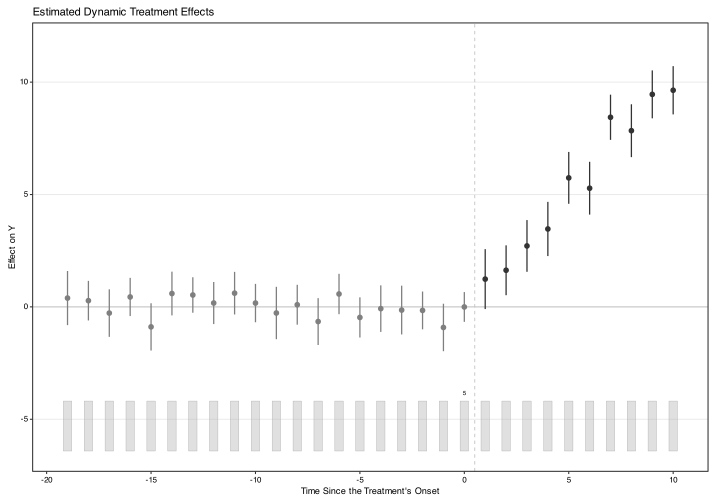
To reproduce figures from earlier submissions exactly (where the visual recipe must match the prior version), pass legacy.style = TRUE:
plot(out, type = "gap", legacy.style = TRUE)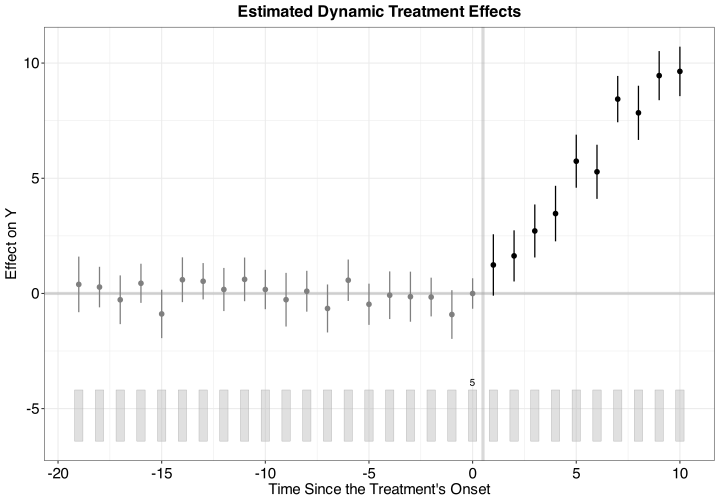
theme.bw = FALSE (the original ggplot2 default theme) is soft-deprecated and slated for removal in fect v2.5.0; passing it now emits a one-time-per-session message.
3.2 The highlight API
For placebo and carryover tests, the modern recipe uses colored-glyph highlighting on the test periods. The behavior is controlled by two arguments:
-
highlight: which test types receive highlighting.NULL(default) auto-detects from the fit.TRUEenables across all types;FALSEdisables. A character subset ofc("placebo", "carryover", "carryover.rm")selects specific types. -
highlight.fill: whenTRUE, draws a lightened-tone background rectangle behind each highlighted period (slide / talk style). WhenFALSE(default), uses glyph-only highlighting that survives grayscale printing.
plot(out, type = "gap")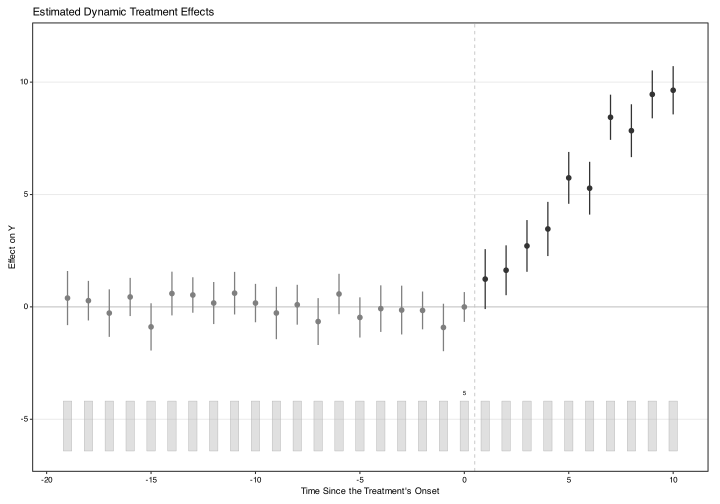
## With background rectangles for talk slides:
plot(out, type = "gap", highlight.fill = TRUE)
3.3 Counterfactual plots
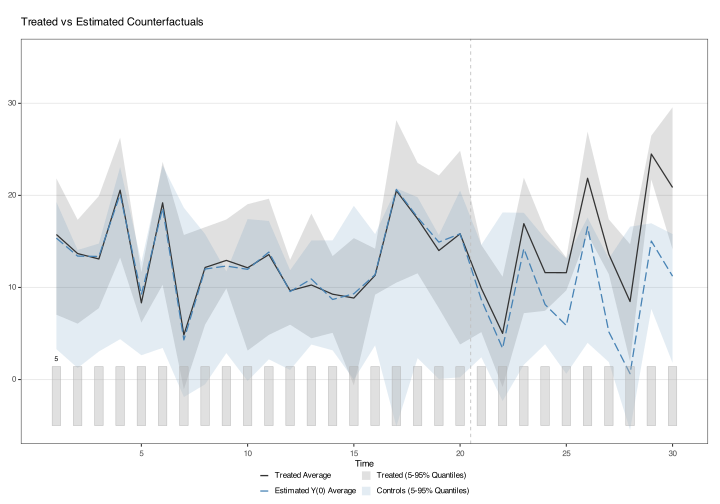
The counterfactual plot type ("counterfactual" or "ct") shows the observed treated-unit trajectory against the imputed counterfactual:
plot(out, type = "counterfactual", raw = "none", main = "")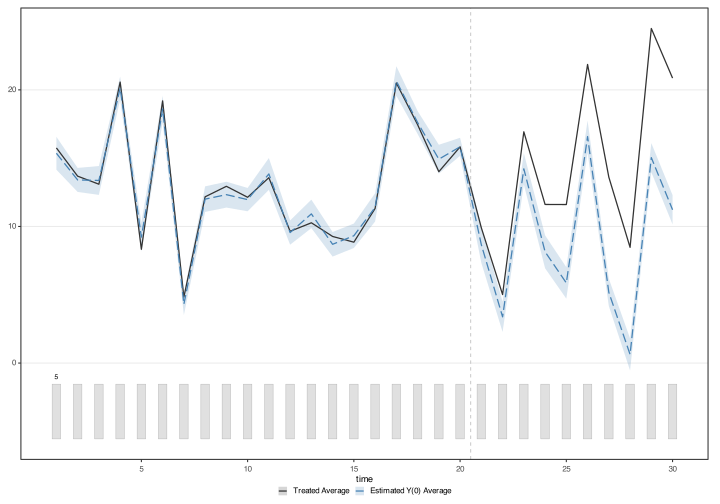
Without post-treatment shading:
plot(out, type = "ct", raw = "none", main = "",
     shade.post = FALSE)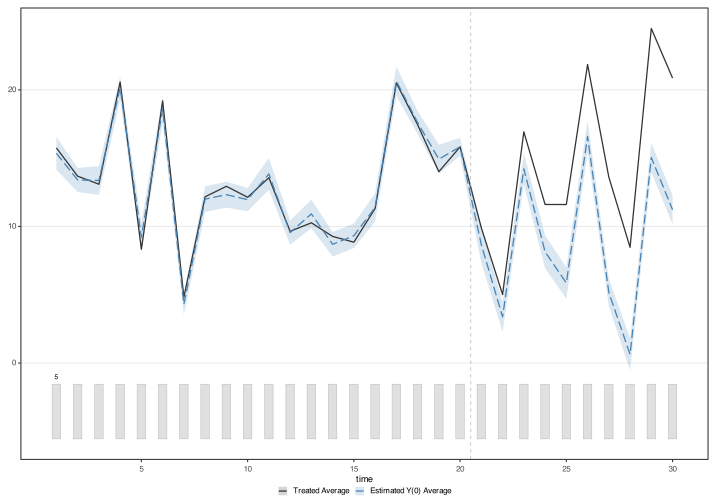
With quantile bands (5th–95th percentile of the control-pool raw outcomes):
With all raw control trajectories overlaid:
plot(out, type = "counterfactual", raw = "all")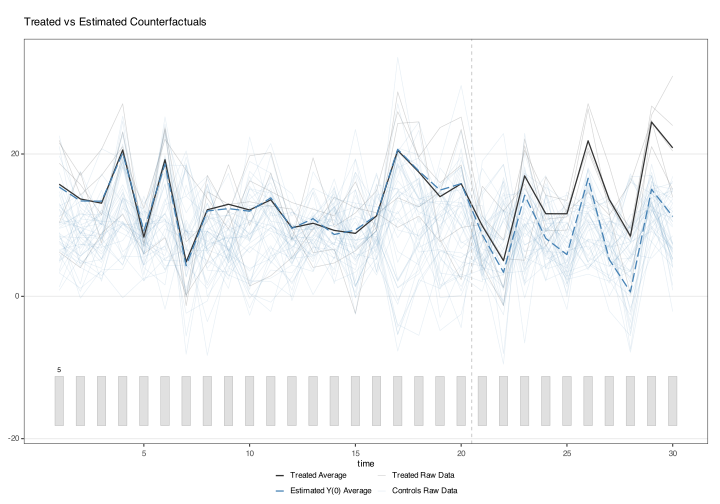
Unit-level counterfactuals via id:
plot(out, type = "counterfactual", id = 102)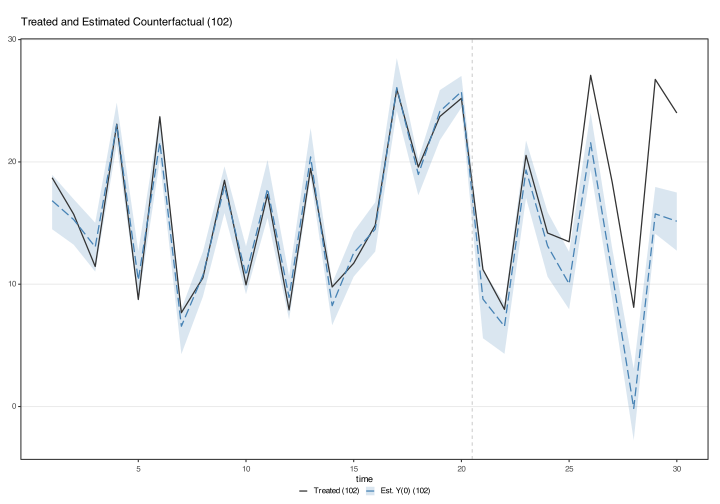
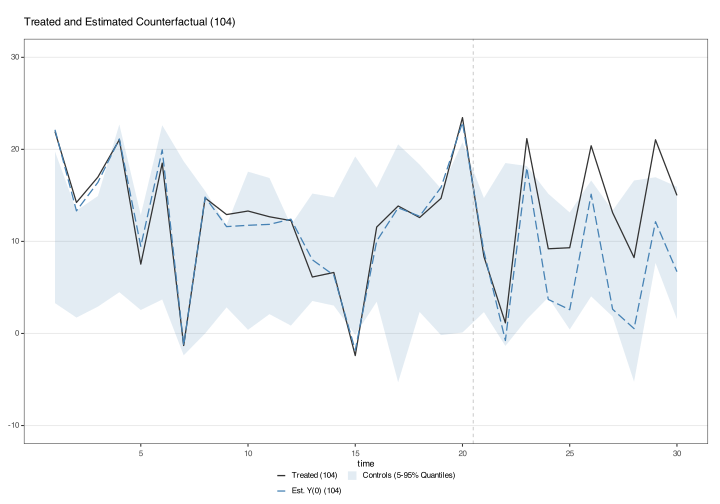
plot(out, type = "counterfactual", id = 105,
     raw = "all", legendOff = TRUE)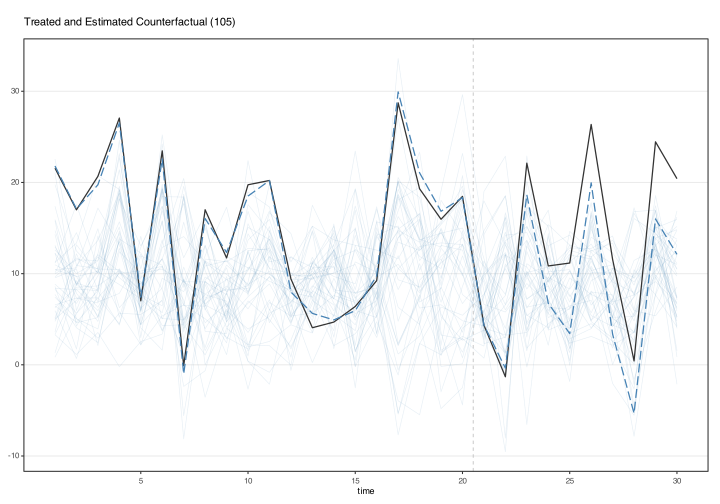
With id, the gap plot shows one treated unit’s gap (its outcome minus its estimated counterfactual) by time relative to its treatment start, or, with several ids, their unweighted average. A unit’s gap is a noisy estimate of its treatment effect because it includes the unit’s idiosyncratic error in each period, which more data do not remove. The effect of a single unit in a single period is not identified; averages over treated units, such as the ATT, are. With parametric inference, as here, the plot adds a band from the chosen units’ bootstrap draws, averaged within each replication when several units are chosen. The band works like a prediction interval for the unit’s effect and shows how far the unit’s idiosyncratic errors can move its gap away from that effect, assuming that the unit’s errors are distributed like those of the control units. A band for one unit is usually wider than the band of the average. With the nonparametric bootstrap or the jackknife, the plot shows point estimates only.
plot(out, type = "gap", id = 102)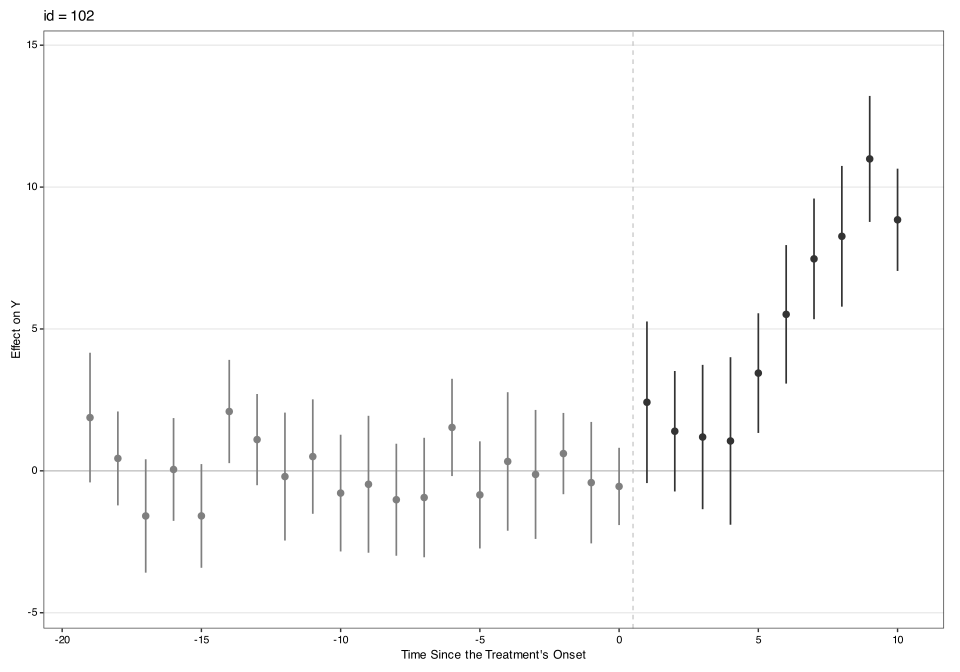
3.4 Factors and loadings
plot(out, type = "factors", xlab = "Time")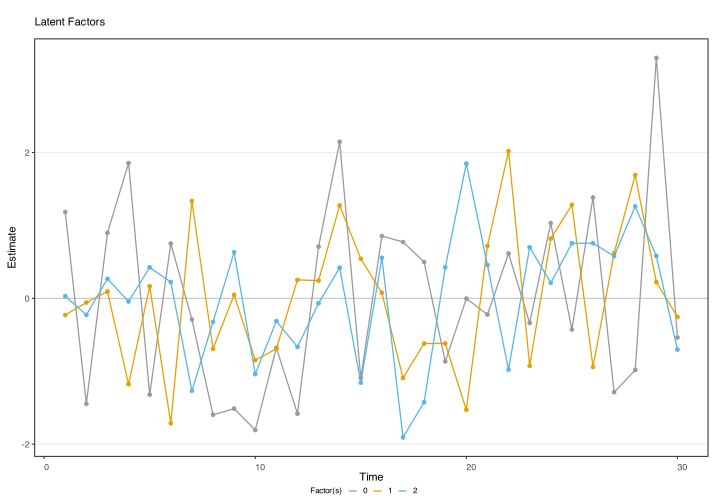
plot(out, type = "loadings")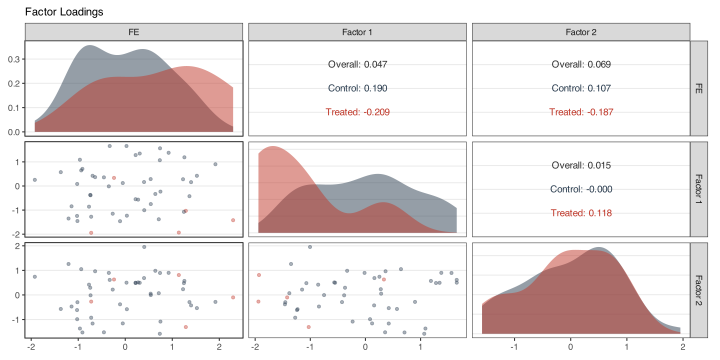
type = "loading.overlap" shows the treated and control loadings in the first two factor dimensions, with the convex hull of control loadings shaded. Treated points outside the hull indicate that the GSC counterfactual extrapolates beyond the observed support. See Chapter 1 §Loading-overlap diagnostic for the workflow.
plot(out, type = "loading.overlap")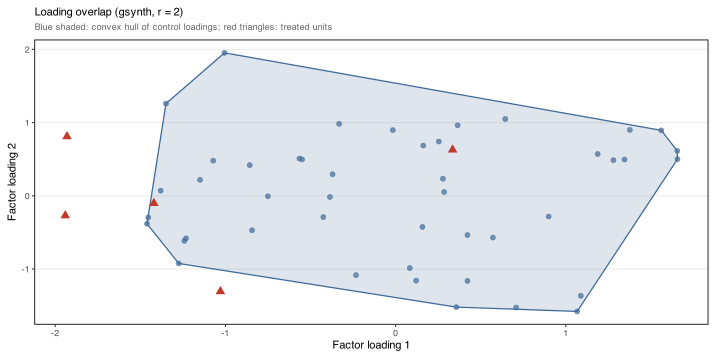
3.5 Raw data and missing-data plots
plot(out, type = "raw")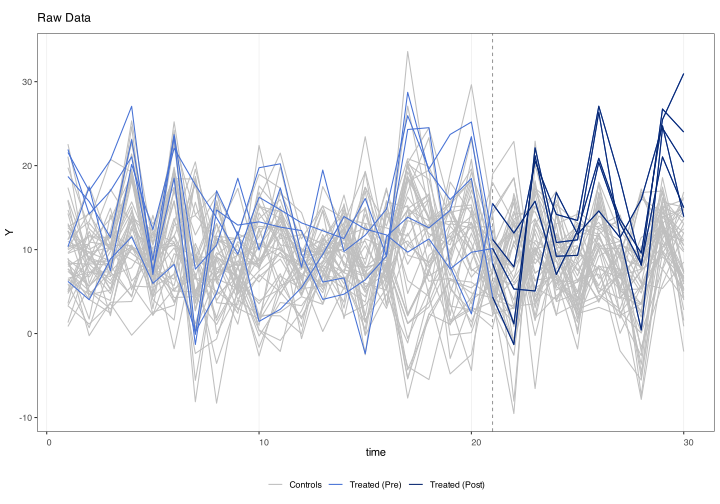
The "missing" plot is most useful on unbalanced panels:
plot(out, type = "missing")The plot is drawn by panelView from the data given to gsynth(): white cells are missing observations, and units that gsynth() removed for having fewer than min.T0 pre-treatment periods still appear. The status used in estimation is in out$obs.missing: 1 = under treatment, 2 = not under treatment (control units, and treated units before treatment), 3 = missing, 4 = unit removed, 5 = placebo period.
3.6 Customizing axes and titles
Standard arguments control axes and the title:
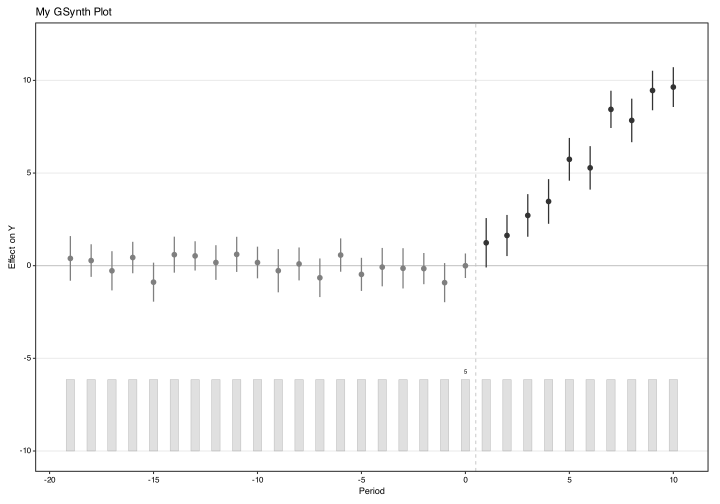
Legend can be suppressed with legendOff = TRUE. Axis labels rotate automatically when there are many time periods; force with axis.adjust = TRUE.