Stata package for A Practical Guide to Counterfactual Estimators for Causal Inference with Time-Series Cross-Sectional Data
Authors: Licheng Liu (MIT); Ye Wang (NYU); Yiqing Xu(Stanford); Ziyi Liu(PKU)
Date: Jun. 10, 2020
Package: fect
Main Reference: A Practical Guide to Counterfactual Estimators for Causal Inference with Time-Series Cross-Sectional Data
Version: 0.1.1 Please report bugs!
We provide 2 methods for the installation of fect:
You can install the development version of the package by typing the following commands in your STATA console:
. cap ado uninstall fect
. net install fect, from(https://raw.githubusercontent.com/xuyiqing/fect_stata/master/) replace
Manual installation takes three simple steps:
. cap ado uninstall fect
. net install fect, all replace from(full_local_path)
The package fect relies on the package reghdfe, users are recommended to update it to the latest version.
. ssc install reghdfe, replace
Two datasets are shipped with the fect package (these sample datasets will be copied into your current directory during installation). In this demo, we will primarily use simdata1. It follows a staggered adoption treatment assignement mechanism, which contains 100 treated units, 100 control units and 35 time periods. The treatment kicks in a staggered adoption fashion from period 21. This package can estimate the average treatment effect (ATT) of the treatment D on the outcome Y, only using information of the outcome, the treatment indicator and the covariates (X1 and X2) from observations under the control status. First we load the data.
. clear

. set more off

. sysuse simdata1
(Written by R.              )
In the current version of fect, users can use five methods to make counterfactual predictions by specifying the method option: fe(fixed effect), ife(interactive fixed effects), mc(matrix completion), bspline(unit-specific bsplines) and polynomial(unit-specific time trends). Now we will illustrate the main grammar and options in fect.
In order to estimate the ATT, users should specify the outcome variable, the unit indicator, the time indicator, the treatment indicator and covariates in the command. As an example, the following command will estimate the average treatment effect(ATT) using the two-way fixed effects(FE) model. The force option (can be “none”, “unit”, “time”, and “two-way”) specifies the additive component(s) of the fixed effects included in the model. The default option is “two-way” (including both unit and time fixed effects). After the estimation, users can then access the stored results by calling e-class commands. The estimated average treatment effects are saved in e(ATT), the average treatment effects by period are saved in e(ATTs), and the estimated coefficients of covariates are saved in e(coefs). All of them are matrices.
. fect Y, treat(D) unit(id) time(time) cov(X1 X2) method("fe") force("two-way")
Balanced Panel Data

. mat list e(ATT)

e(ATT)[1,2]
          ATT          N
r1  3.4890777        900

. mat list e(ATTs)

e(ATTs)[47,3]
              s           n         ATT
 r1         -31          20  -.77109593
 r2         -30          20  -.60864002
 r3         -29          20  -.17312056
 r4         -28          40  -.46861663
 r5         -27          40  -.46439406
 r6         -26          40   .05438881
 r7         -25          60  -.52462173
 r8         -24          60  -.53337729
 r9         -23          60  -.24292614
r10         -22          80  -.53957587
r11         -21          80  -.65655398
r12         -20          80  -.49383137
r13         -19         100  -1.0453175
r14         -18         100  -.05875193
r15         -17         100  -.04025012
r16         -16         100  -.87856668
r17         -15         100  -.22867775
r18         -14         100  -.28897884
r19         -13         100  -.66388309
r20         -12         100  -.49370825
r21         -11         100   .05098252
r22         -10         100  -.06818308
r23          -9         100  -.02093183
r24          -8         100    .7874155
r25          -7         100   .33847243
r26          -6         100   .07501461
r27          -5         100   .81570309
r28          -4         100   .50591278
r29          -3         100   .76799464
r30          -2         100   1.5626798
r31          -1         100   1.1092701
r32           0         100   .56834823
r33           1         100   1.8688202
r34           2         100   2.1402876
r35           3         100   1.5997123
r36           4          80   3.5116136
r37           5          80   3.6261504
r38           6          80   2.1411843
r39           7          60   4.0951562
r40           8          60   4.4478188
r41           9          60   4.2820454
r42          10          40   4.0149078
r43          11          40   5.1074643
r44          12          40   5.8417196
r45          13          20   7.4508367
r46          14          20   8.5741386
r47          15          20   7.4203806

. mat list e(coefs)

e(coefs)[1,3]
         cons         X1         X2
r1  10.043207  .92796433  3.0523357
After the estimation, fect will draw a graph visualizing the estimated average treatment effects by period.
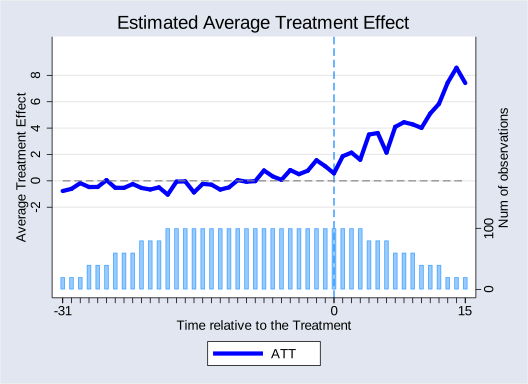
For the reference, the true population average effects in simdata1 rise from 1 to 3 from the first post-treatment period to the last. The bar plot at the bottom of the plot shows the number of treated units for each time period.
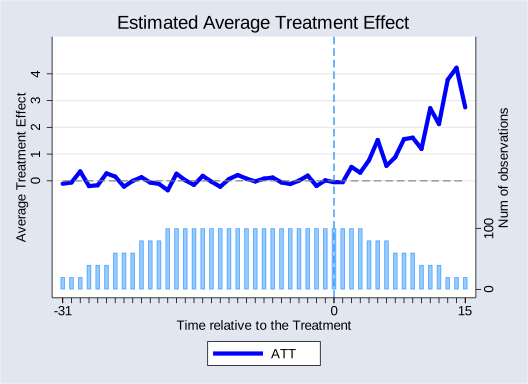
In addition to the two-way fixed effects model, fect also supports the interactive fixed effects (IFE) model. For the IFE approach, users need to specify the number of factors(default to 1) using option r(). For example, the following command will estimate the average treatment effects using an IFE model with 2 factors.
. fect Y, treat(D) unit(id) time(time) cov(X1 X2) method("ife") force("two-way") r(2)
Balanced Panel Data
Users can access the results in the same way as in the FE model.
. mat list e(ATT)

e(ATT)[1,2]
          ATT          N
r1  1.1177092        900

. mat list e(ATTs)

e(ATTs)[47,3]
              s           n         ATT
 r1         -31          20  -.10835096
 r2         -30          20  -.06038439
 r3         -29          20   .35214481
 r4         -28          40  -.19475068
 r5         -27          40  -.16424079
 r6         -26          40   .27811673
 r7         -25          60   .15796195
 r8         -24          60  -.21596542
 r9         -23          60  -.00164069
r10         -22          80   .13636349
r11         -21          80  -.06286745
r12         -20          80  -.11484522
r13         -19         100  -.35158613
r14         -18         100   .26509574
r15         -17         100   .02230865
r16         -16         100  -.15006728
r17         -15         100   .18560499
r18         -14         100  -.03165312
r19         -13         100  -.22084346
r20         -12         100   .06744679
r21         -11         100   .21657231
r22         -10         100   .08356623
r23          -9         100  -.02173787
r24          -8         100   .08333752
r25          -7         100   .12237962
r26          -6         100  -.05976924
r27          -5         100  -.11873318
r28          -4         100   .00759421
r29          -3         100   .19577003
r30          -2         100  -.19017716
r31          -1         100    .0174254
r32           0         100  -.04931726
r33           1         100  -.04900107
r34           2         100   .52023405
r35           3         100    .3050181
r36           4          80   .76847726
r37           5          80   1.5267484
r38           6          80    .5630399
r39           7          60   .88419515
r40           8          60   1.5579557
r41           9          60   1.6127996
r42          10          40   1.1938372
r43          11          40   2.7152529
r44          12          40   2.1226153
r45          13          20   3.7801797
r46          14          20   4.2262712
r47          15          20   2.7478838

. mat list e(coefs)

e(coefs)[1,3]
         cons         X1         X2
r1  11.387863  .95892048  3.0127917
Note: When running on a large dataset, the IFE model may be time-consuming. One makeshift is to use a larger tolerance criterion for convergence (by setting the option tol() in the command), but it may yield a less accurate estimation.
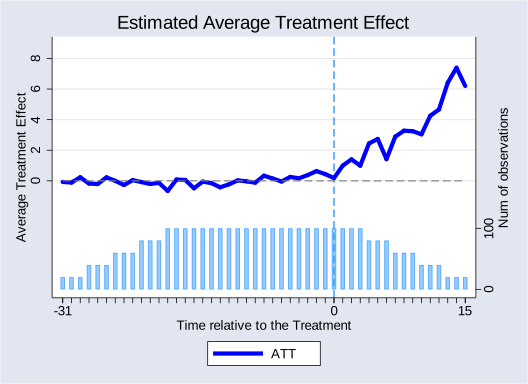
For the MC method, users also need to specify a hyper-parameter (the penalty term) lambda(default to 1) in the command. For example, the following command will estimate the average treatment effect using a MC model with lambda equal to 0.004.
. fect Y, treat(D) unit(id) time(time) cov(X1 X2) method("mc") lambda(0.004)
Balanced Panel Data

. mat list e(ATT)

e(ATT)[1,2]
          ATT          N
r1  2.5668276        900

. mat list e(coefs)

e(coefs)[1,3]
         cons         X1         X2
r1  11.201599  .94348337  3.0173834
This package ships a cross-validation procedure to help determine the tuning parameter in ife, mc, bspline and polynomial models.The cross-validation procedure is ran for k folds (default to 10, can be set in the option kfold()) and the candidate tuning parameter corresponding to the minimal mean squared prediction error(mspe) will be selected. In each round, some observations are removed as the testing set to evaluate the prediction ability of the model with a certain tuning parameter. To alleviate the concern of the serial correlation within a unit, users can remove a consecutive number of observations from a unit as elements in the testing set in order to avoid over fitting caused by serial correlation. The consecutive number is specified in the option cvnobs() (default to 3). After the cross-validation, the mean squared prediction error for each hyper-parameter is saved in e(CV) and the minimum of it is saved as e(min_mspe).
The cross-validation procedure will be implemented in the following scenarios:
1, If users cannot determine which method to use, the cross-validation procedure with method set to “both” can automatically determine the method based on both methods’ out-of-sample predication performance. In this case, the algorithm selects the IFE method, which is the correct model specification. Note that FE is a special case of IFE when r=0. Users can set the maximum number of factors for searching in the ife model in option r() and the number of grids of lambda(s) in nlambda() (default to 10). For the mc model, a lambda normalized by the maximum singular value of the demeaned outcome will be computed and presented too.
. fect Y, treat(D) unit(id) time(time) cov(X1 X2) method("both")  r(4) nlambda(15)
Balanced Panel Data
-------------------------------------------------------------------------------------------------------------------------------------------------------------
Cross Validation...
fe r=0 force=two-way mspe=8.538
ife r=1 force=two-way mspe=5.437
ife r=2 force=two-way mspe=4.772
ife r=3 force=two-way mspe=5.339
ife r=4 force=two-way mspe=6.146
mc: lambda=.0178 lambda.norm=1 mspe=8.538
mc: lambda=.0105 lambda.norm=.588 mspe=6.98
mc: lambda=.0062 lambda.norm=.346 mspe=5.693
mc: lambda=.0036 lambda.norm=.203 mspe=5.187
mc: lambda=.0021 lambda.norm=.119 mspe=5.272
mc: lambda=.0013 lambda.norm=.07 mspe=5.309
mc: lambda=.0007 lambda.norm=.041 mspe=5.329
mc: lambda=.0004 lambda.norm=.024 mspe=5.391
mc: lambda=.0003 lambda.norm=.014 mspe=5.605
mc: lambda=.0001 lambda.norm=.008 mspe=6.386
mc: lambda=.0001 lambda.norm=.005 mspe=8.408
mc: lambda=.0001 lambda.norm=.003 mspe=8.461
mc: lambda=0 lambda.norm=.002 mspe=8.493
mc: lambda=0 lambda.norm=.001 mspe=8.511
mc: lambda=0 lambda.norm=.001 mspe=8.523
choose fe/ife model with optimal r=2

. di e(min_mspe)
4.7723098

. matrix list e(CV)

e(CV)[5,2]
            r       mspe
r1          0  8.5383835
r2          1  5.4368229
r3          2  4.7723098
r4          3  5.3389702
r5          4   6.146081
2, When the option lambda has a numlist input and the option method is set to “mc”, the results will be compared across all lambdas.
. fect Y, treat(D) unit(id) time(time) cov(X1 X2) method("mc") lambda(0.001 0.002 0.003 0.004 0.005)
Balanced Panel Data
-------------------------------------------------------------------------------------------------------------------------------------------------------------
Cross Validation...
mc: lambda=.001 lambda.norm=.056 mspe=5.315
mc: lambda=.002 lambda.norm=.112 mspe=5.283
mc: lambda=.003 lambda.norm=.168 mspe=5.208
mc: lambda=.004 lambda.norm=.224 mspe=5.202
mc: lambda=.005 lambda.norm=.28 mspe=5.374
optimal lambda=.004 in mc model

. matrix list e(CV)

e(CV)[5,2]
       lambda       mspe
r1       .001  5.3150454
r2       .002  5.2828522
r3       .003  5.2078257
r4       .004   5.202373
r5       .005  5.3743281
3, When the option cv is on, the mspe of the specified method will be calculated. For the ife method, models with number of factors ranging from 0 to r() will be compared. For the mc method, mspe for the specified lambda will be computed, no matter whether lambda() has a numlist input or not. Users can also restrict the testing set to observations only from treated units by setting the option cvtreat on.
. fect Y, treat(D) unit(id) time(time) cov(X1 X2) method("ife") r(4) cv cvtreat
Balanced Panel Data
-------------------------------------------------------------------------------------------------------------------------------------------------------------
Cross Validation...
fe r=0 force=two-way mspe=8.616
ife r=1 force=two-way mspe=5.736
ife r=2 force=two-way mspe=4.905
ife r=3 force=two-way mspe=5.659
ife r=4 force=two-way mspe=6.661
optimal r=2 in fe/ife model
The algorithm produces uncertainty estimates when se is on. One can use the non-parametric bootstrap procedure by setting vartype() to “bootstrap” (also the default setting). Note that it only works well when the treatment group is relatively large, e.g. larger than 40. The number of bootstrap runs is set by nboots(). Alternatively, users can obtain uncertainty estimates using the jackknife method by by setting vartype() to “jackknife”. The algorithm obtains standard errors by iteratively dropping one unit (the entire time-series) from the dataset. After the estimation, users can then access the stored results by calling e-class commands. The estimated average treatment effects are saved in e(ATT), the average treatment effects by period are saved in e(ATTs), and the estimated coefficients of covariates are saved in e(coefs).
. fect Y,  treat(D) unit(id) time(time) cov(X1 X2) method("ife") r(2) se nboots(100)
Balanced Panel Data
-------------------------------------------------------------------------------------------------------------------------------------------------------------
Bootstrapping...
ATT Estimation: Already Bootstrapped 100 Times

. mat list e(ATT)

e(ATT)[1,6]
            ATT            N           sd  Lower_Bound  Upper_Bound       pvalue
r1    1.1177092          900    .25850742     .5651055    1.6380218            0

. mat list e(ATTs)

e(ATTs)[47,7]
                s             n           ATT        ATT_sd   ATT_p_value  ATT_Lower_~d  ATT_Upper_~d
 r1           -31            20    -.10835096      .4310421     .80152822     -.7895304     .85068578
 r2           -30            20    -.06038439     .50693184     .90518236    -1.0389884     .98678583
 r3           -29            20     .35214481     .41575682     .39699677    -.35386431     1.1824859
 r4           -28            40    -.19475068     .26625523     .46450824    -.78490198     .23869842
 r5           -27            40    -.16424079     .29858685     .58227795     -.8895551     .31997144
 r6           -26            40     .27811673     .24735154     .26085252     -.1542975     .85295516
 r7           -25            60     .15796195     .19663931     .42179668    -.21555533     .55887252
 r8           -24            60    -.21596542     .24899581     .38575268    -.62279195     .28883922
 r9           -23            60    -.00164069     .21150543     .99381071    -.45867634     .45035744
r10           -22            80     .13636349     .20719628     .51045024    -.27630085     .52443373
r11           -21            80    -.06286745     .20200366     .75563389    -.44826174     .38877547
r12           -20            80    -.11484522     .19158117     .54886627    -.53973246     .19411793
r13           -19           100    -.35158613     .15955622     .02755777    -.66962087     -.0519049
r14           -18           100     .26509574     .18690522      .1560906    -.12355641     .60600609
r15           -17           100     .02230865     .14717668      .8795203    -.28904003     .31616765
r16           -16           100    -.15006728     .17020826     .37795603    -.53622365     .17316614
r17           -15           100     .18560499     .19491062     .34096667    -.23731235     .53748679
r18           -14           100    -.03165312     .14598237     .82834208    -.31481344     .24974313
r19           -13           100    -.22084346     .18919691     .24310224    -.55068594     .14983009
r20           -12           100     .06744679     .16847959     .68891627    -.22389117     .40835366
r21           -11           100     .21657231     .15767087     .16957456    -.13480952     .48548201
r22           -10           100     .08356623     .16362417     .60954672     -.1950033     .45377755
r23            -9           100    -.02173787     .17451134     .90086854    -.31801969     .34963101
r24            -8           100     .08333752     .16451749     .61246556     -.2079104     .46332332
r25            -7           100     .12237962     .17575169     .48622772    -.28059134     .45818549
r26            -6           100    -.05976924     .14474356     .67965651    -.33350363     .24963236
r27            -5           100    -.11873318     .17456862     .49640831    -.45260999     .26205447
r28            -4           100     .00759421     .16938299     .96423918    -.30217379     .38218406
r29            -3           100     .19577003     .16366801     .23164152    -.08811902     .48325184
r30            -2           100    -.19017716     .14931282      .2027759     -.4272626     .08058163
r31            -1           100      .0174254      .1702151     .91846073    -.34297195     .36024907
r32             0           100    -.04931726     .16113946      .7595641    -.38931146     .20763522
r33             1           100    -.04900107     .31514415     .87643677    -.75633675     .50669175
r34             2           100     .52023405      .3510232      .1383269    -.17269914     1.2584279
r35             3           100      .3050181     .34021616     .36996332    -.37514228     .95727777
r36             4            80     .76847726     .33462676     .02164613        .15566     1.4568437
r37             5            80     1.5267484     .34181815     7.949e-06     .84480536     2.1678679
r38             6            80      .5630399     .29836237     .05914676     .00381862     1.1758828
r39             7            60     .88419515      .5170598     .08725769     -.0086214     2.0059652
r40             8            60     1.5579557     .52061015     .00276651      .3593998     2.6675785
r41             9            60     1.6127996       .465763     .00053478      .5999316     2.4206164
r42            10            40     1.1938372     .72642702     .10029251    -.08183594     2.7028506
r43            11            40     2.7152529      .5470615     6.929e-07     1.5546281     3.8903532
r44            12            40     2.1226153      .6129142     .00053389     .75084776      3.388536
r45            13            20     3.7801797     .96590805     .00009093      1.688713     5.3416557
r46            14            20     4.2262712      1.058465     .00006529     2.1043487      6.465354
r47            15            20     2.7478838     1.0413667     .00832176     .75889599     5.1415553

. mat list e(coefs)

e(coefs)[3,5]
             coef           sd      p_value  lower_bound  upper_bound
cons    11.387862    .29894611            0    10.780995    12.048532
  X1    .95892048    .02973494            0    .89947993    1.0079873
  X2    3.0127916    .02805474            0     2.955739    3.0678375
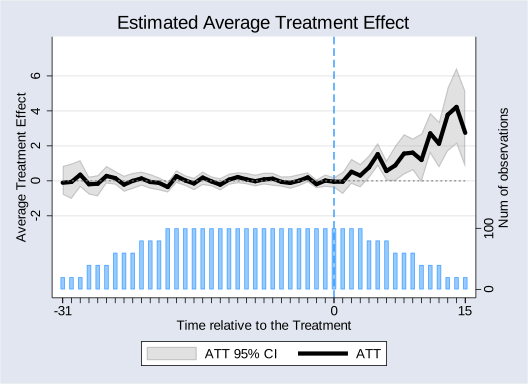
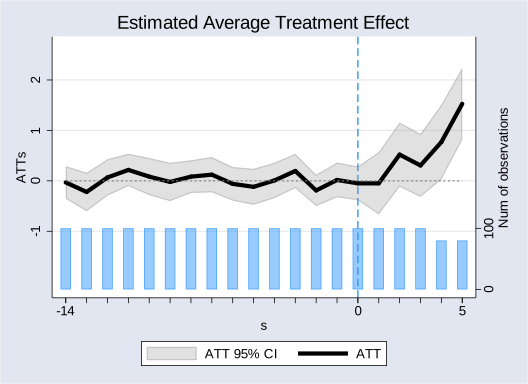
For better visuals, users can limit the period relative to the treatment in the plot to [-14,5]. Users can also change the label of the x-axis, the y-axis and the title by using the options xlabel(), ylabel() and title(), respectively.
. fect Y,  treat(D) unit(id) time(time) cov(X1 X2) method("ife") r(2) se preperiod(-14) offperiod(5) xlabel("s") ylabel("ATTs") vartype("jackknife")
Balanced Panel Data
-------------------------------------------------------------------------------------------------------------------------------------------------------------
Jackknifing...
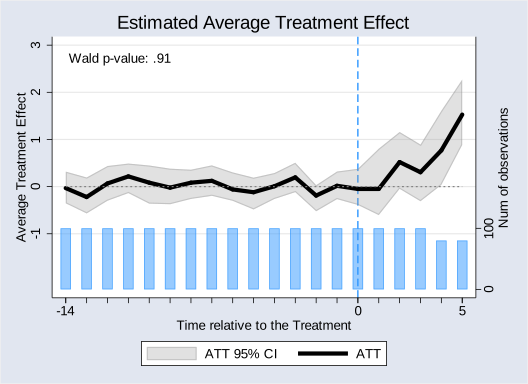
This package offer several tests for the accuracy and the robustness of the model. First, it offers a goodness-of-fit test (a variant of the Wald test) to gauge the presence of pre-treatment (differential) trends. Users can conduct this test by setting the option wald on. As a result, the p-value of the Wald test will be shown in the graph and be saved in e(wald_pvalue). A small p-value suggests that the test rejects the null hypothesis that the pre-treatment residuals averages over time are jointly close to zero. In the paper, however, we discuss why the Wald test is not as desirable as an equivalent test. Users can specify a test range in the option preperiod(). For example, preperiod(-4) means that we test pre-treatment trend of the last 5 periods prior(-4 to 0) to the treatment. All periods prior to the treatment will be gauged in the default setting.
. fect Y,  treat(D) unit(id) time(time) cov(X1 X2) se method("ife") r(2) preperiod(-14) offperiod(5) wald nboots(100)
Balanced Panel Data
-------------------------------------------------------------------------------------------------------------------------------------------------------------
Bootstrapping...
ATT Estimation: Already Bootstrapped 100 Times
-------------------------------------------------------------------------------------------------------------------------------------------------------------
Wald Testing...
Wald Testing: Already Simulated 100 Times
The p-value in wald test is .91

. di e(wald_pvalue)
.91
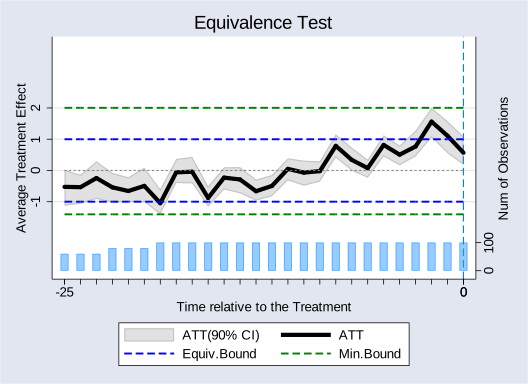
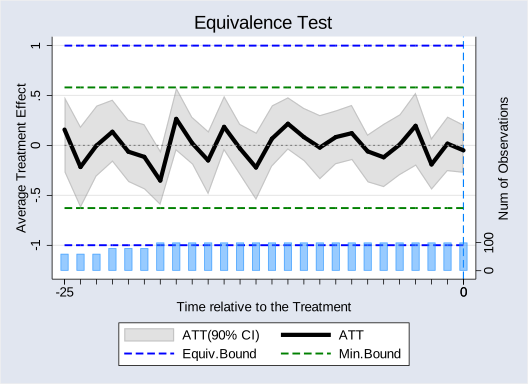
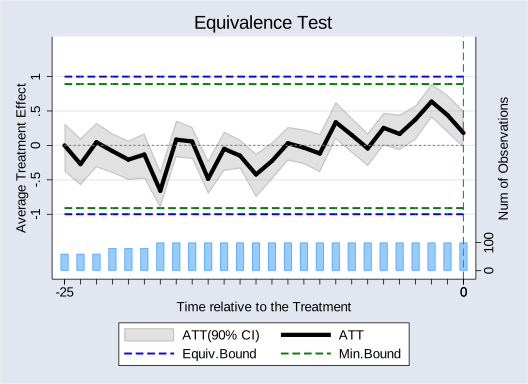
Users can evaluate whether the identification assumption is likely to be valid by conducting an equivalence test. It checks whether the 90% confidence intervals for estimated ATTs at pre-treatment period exceed a pre-specified range. While users can check the values of confidence intervals, fect give a visualization of the equivalence test. When the option equiTest is on, all of the pre-treatment residual average, the equivalence confidence intervals(0.36 times the residual standard deviation) and the minium bounds will be drawn. The test range is also specified in the option preperiod(). Below, we visualize the result of the equivalence test for each of the three estimators using our simulated data. These figures show that both the IFE and MC methods pass the equivalence test while the FE method does not.
FE model
. fect Y,  treat(D) unit(id) time(time) cov(X1 X2) se method("fe") preperiod(-25) offperiod(0) equiTest nboots(100)
Balanced Panel Data
-------------------------------------------------------------------------------------------------------------------------------------------------------------
Bootstrapping...
ATT Estimation: Already Bootstrapped 100 Times
-------------------------------------------------------------------------------------------------------------------------------------------------------------
Equivalence Test
Equivalence Test...Fail at s=-25
Equivalence Test...Fail at s=-24
Equivalence Test...Fail at s=-22
Equivalence Test...Fail at s=-21
Equivalence Test...Fail at s=-20
Equivalence Test...Fail at s=-19
Equivalence Test...Fail at s=-16
Equivalence Test...Fail at s=-8
Equivalence Test...Fail at s=-5
Equivalence Test...Fail at s=-3
Equivalence Test...Fail at s=-2
Equivalence Test...Fail at s=-1
Equivalence Test...Fail at s=0
Equivalence Test...Fail
IFE model
. fect Y,  treat(D) unit(id) time(time) cov(X1 X2) se method("ife") r(2) preperiod(-25) offperiod(0) equiTest nboots(100)
Balanced Panel Data
-------------------------------------------------------------------------------------------------------------------------------------------------------------
Bootstrapping...
ATT Estimation: Already Bootstrapped 100 Times
-------------------------------------------------------------------------------------------------------------------------------------------------------------
Equivalence Test
Equivalence Test...Pass
MC model
. fect Y,  treat(D) unit(id) time(time) cov(X1 X2) se method("mc") lambda(0.004) preperiod(-25) offperiod(0) equiTest nboots(100)
Balanced Panel Data
-------------------------------------------------------------------------------------------------------------------------------------------------------------
Bootstrapping...
ATT Estimation: Already Bootstrapped 100 Times
-------------------------------------------------------------------------------------------------------------------------------------------------------------
Equivalence Test
Equivalence Test...Pass
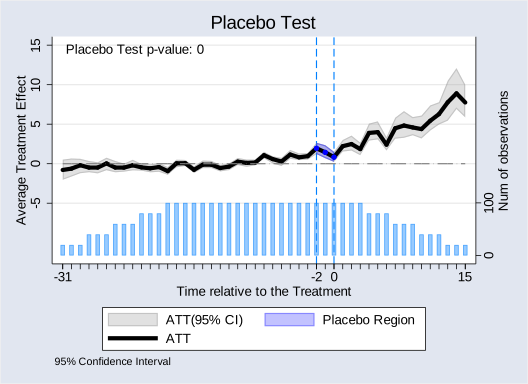
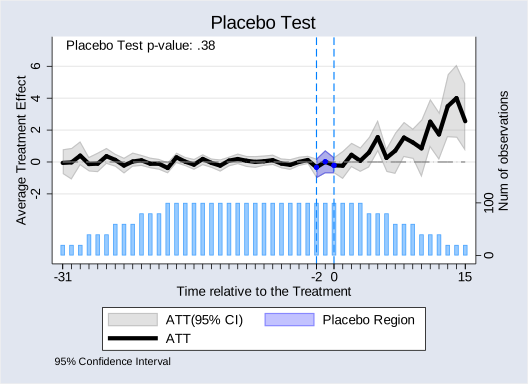
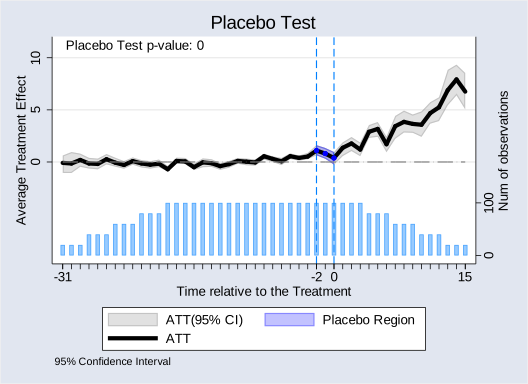
In addition to them, fect provides a placebo test to alleviate the concern of over-fitting in the pre-trend. Users can specify a range of pre-treatment periods as “placebo periods” in the option placeboperiod() to remove observations in the specified range for model fitting, and then test whether the estimated ATT in this range is significantly different from zero. By default, we set [-2, 0] as the placebo periods (placeboperiod(3)) and the plot will display the p-value of the placebo test. Below, we visualize the result of the placebo test for each of the three estimators using our simulated data. These figures show that only the IFE method pass the placebo test test.
FE model
. fect Y,  treat(D) unit(id) time(time) cov(X1 X2) se method("fe") placeboTest nboots(100)
Balanced Panel Data
-------------------------------------------------------------------------------------------------------------------------------------------------------------
Placebo Test...
Bootstrapping...
ATT Estimation: Already Bootstrapped 100 Times
Placebo Test Fail
IFE model
. fect Y,  treat(D) unit(id) time(time) cov(X1 X2) se method("ife") r(2) placeboTest nboots(100)
Balanced Panel Data
-------------------------------------------------------------------------------------------------------------------------------------------------------------
Placebo Test...
Bootstrapping...
ATT Estimation: Already Bootstrapped 100 Times
Placebo Test Pass
MC model
. fect Y,  treat(D) unit(id) time(time) cov(X1 X2) se method("mc") lambda(0.004) placeboTest nboots(100)
Balanced Panel Data
-------------------------------------------------------------------------------------------------------------------------------------------------------------
Placebo Test...
Bootstrapping...
ATT Estimation: Already Bootstrapped 100 Times
Placebo Test Fail
When running on huge dataset, the fect R version is faster than the Stata version and thus will be a better choice, this is because we use C++ and parallel computing in R to accelerate the computation.